Free images tag: 4G
Unlock the Power of Smart Metering: A Closer Look at the Future of Energy Management
Some Acronyms
IHD - In-Home Display (like the Trio 3)
WAN - Wide Area Network (like the Internet)
HAN - Home Area Network (like Zigbee)
DCC - Data and Communications Company (like a Coordinator)
SMETS1 - Smart Metering Equipment Technical Specifications (Version 1)
SMETS2 - Smart Metering Equipment Technical Specifications (Version 2)
Interconnected
Imagine a world where your energy consumption is no longer a mystery, where you're not just a passive consumer but an active participant in the energy ecosystem. Welcome to the realm of smart metering, a dynamic duo of innovations that brings your energy usage to life and bridges the gap between you and your energy supplier like never before. Let's embark on a journey through the heart of this groundbreaking system, where two interconnected marvels, the Home Area Network, and the Wide Area Network, pave the way for a brighter, more efficient future.
Home Area Network: Where Your Energy Story Begins
Step into the Home Area Network (HAN), an ingenious cornerstone within your abode's walls. Think of it as the beating heart of the smart metering revolution entrusted to the care of your energy supplier. Nestled within this network are the remarkable smart meters, the in-home display acting as your energy interpreter, and the communication hub – your home's energy command center.
Picture this hub as a vibrant energy orchestra conductor orchestrating a symphony of data flows. Like diligent messengers, your smart meters wirelessly transmit vital energy insights to this hub. And like magic, the hub dispatches this treasure trove of information to your in-home display and energy supplier. It's a dance of connectivity that transforms mere data into actionable wisdom.
A cable connects hub SEAP-2001-V to the Electricity meter and wirelessly to the local HAN network for the Gas Meter and the WAN for DDC meter readings.
The GAS meter sends its readings over the HAN to the HUB for forwarding over the LAN to the DCC for onward transmission to the billing company. The IHD picks up the meter readings from the HUB over the HAN for local convenient display for the customer.
But here's the twist: harmony is disrupted if the Home Area Network falters. Smart meters lose their voice, and the in-home display falls silent. The vital conversation between you and your energy supplier stutters. It's a reminder of the intricate ballet that powers this new-age relationship.
Wide Area Network: Where Conversations Transcend Boundaries
As we journey beyond the confines of our homes, we encounter the Wide Area Network (WAN), an expansive realm that bridges gaps and brings the world of smart metering to life on a grand scale. Imagine it as a vast web of communication threads spanning across cities and landscapes, uniting smart meters and energy suppliers in a seamless conversation.
This grandeur exchange occurs over a secure network reminiscent of the technology behind our trusty mobile phones. And at the heart of this exchange lies the communications hub, a master connector between the intimate Home Area Network and the sprawling Wide Area Network. When all is well in this realm, the dialogue between smart meters and suppliers flows effortlessly, enriching both sides with valuable insights.
If you live in a weak 4G signal area, the WAN can fail to connect to the network, and meter readings are not transmitted to the billing companies. You may find an 'aerial extension' from the HUB installed to reach a more reliable or stronger 4G from the WAN connection.
Yet, just as nature has its storms, so does technology. When the Wide Area Network faces turbulence, the symphony of communication falters. Smart meters lose their voice, and the vibrant exchange with suppliers quietens. It's a reminder of the delicate equilibrium that fuels this dynamic conversation.
The Marvel of Evolution: From Third-Party to National Network
In this saga of innovation, we encounter a fascinating evolution in the realm of communications networks. In the early chapters, third-party networks took center stage, enabling the magic of smart meters to touch our lives. Then, a purpose-built national communications network emerged with a flourish, an architectural marvel sculpted by the Data and Communications Company (DCC). This new era promised even greater wonders.
Yet, like all great transformations, the transition wasn't without its challenges. The national network, while potent, wasn't ready when the smart meter wave began. To ensure you could experience the marvels of smart meters, energy suppliers harnessed the power of third-party networks. First-generation smart meters danced to the tune of these networks, sharing their insights with suppliers.
Enter the second generation, donning the cloak of progress. These smart meters seamlessly embraced the purpose-built national network, painting a portrait of connectivity unparalleled in its elegance. But there's a catch: the tale of the SMETS1 meters, their magic bound to a single supplier. When the supplier changes, the magic dims, and the meters are in a "dumb" slumber. Yet fret not for the Data and Communications Company toils to awaken these slumbering sentinels, ensuring compatibility with all suppliers in a symphony of phases.
As we close this chapter, we stand on the precipice of a new dawn in energy management. Smart metering, with its twin enigmas of Home Area Network and Wide Area Network, promises a future where energy is no longer a mystery but a symphony of understanding. It's a dance of data, a connectivity conversation, and an ode to progress. So, embrace the magic, for the journey has only just begun.
Conclusion
Smart Metering Equipment Technical Specifications Version 1 (SMETS1 meters) are limited to a single, original energy company with attempts made to remotely convert them to the SMETS2 version, not all of which are successful.

SM1 on the body of the energy meter identifies it as a SMETS1 Meter.
Smart Metering Equipment Technical Specifications version 2 (SMETS2 meters) are a universal meter connection that connects to DCC and is not limited to a single energy supplier. All new Smart Meters are SMETS2.
Google VPN is not Connecting (fix).
Technology July 11, 2023 0
VPN by Google One can encrypt and secure your internet traffic by using the Google Virtual Private Network to connect your phone to the internet.
One problem with the Google VPN is that it keeps disconnecting or won't connect. Sometimes it connects, and other times it won't. It is frustrating to have a paid service that just isn't reliable. With all this technology, why can Google make their VPN work properly? We have the fix for that.
Testing
There is a solution, but you can do some testing first to ensure the Google One VPN fix will suit your disconnecting problem.
Firstly
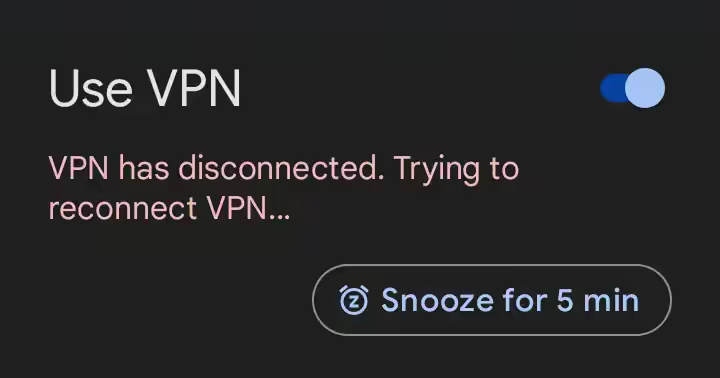
Test the VPN on WiFi only.
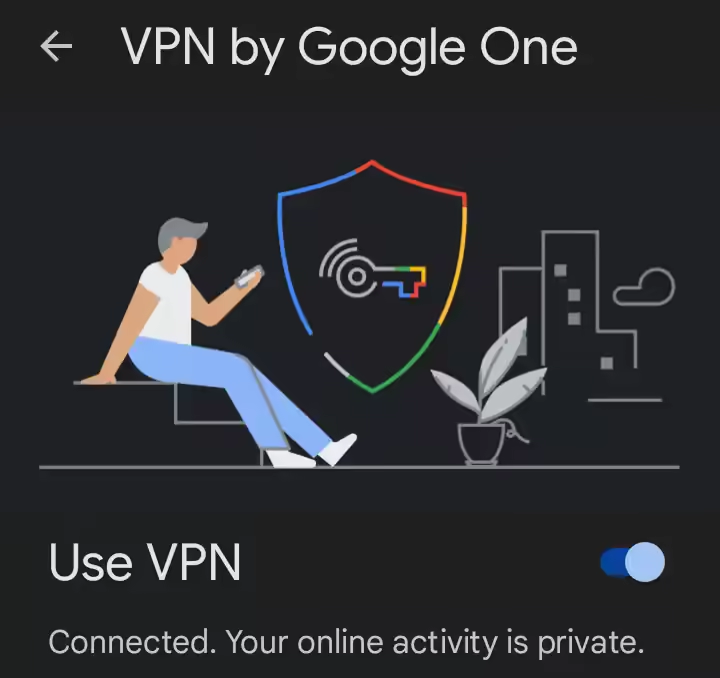
Switch off Mobile Data and see if the Use VPN gives you the 'Connected. Your online activity is private.' message.
You will expect to see a static 'VPN is connecting...' and the red failure message 'VPN has disconnected and trying to reconnect VPN...' in a constant loop.
Secondly
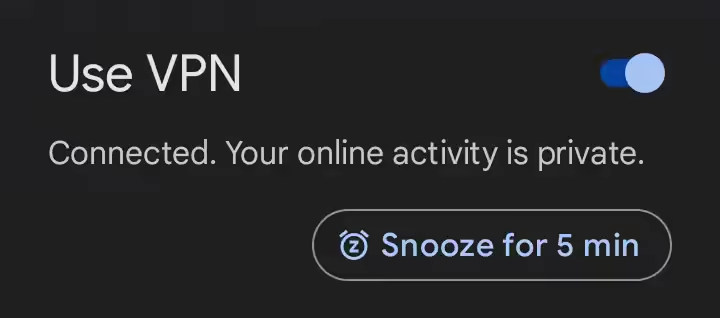
Test the VPN on Mobile Data only.
Switch off WiFI and see if the Use VPN gives you the 'Connected. Your online activity is private.' message.
At this point, it gets exciting if you do see the 'Connected. Your online activity is private.' message.
You think the problem may be solved, and the Google VPN now protects your internet.
Well, your VPN is working, but switch back to wifi only again and see the cycle of the VPN not working on wifi but working on mobile data (3G/4G/5G). This indicates the home router is the problem in this instance.
If your VPN works on mobile data but fails to connect when on WiFi, you can be quite confident that the home router is the problem and this solution will work for you.
Router
Most home routers have an additional setting, the web administration interface, often found at http://192.168.1.1 or http://192.168.1.254, but you can often find the router's address on the back or underside of it. Whatever the router's address, you need to log into the router with the username and password to change the settings. Your ISP could help you with this, particularly if they supplied your home router as part of the broadband package.
Settings
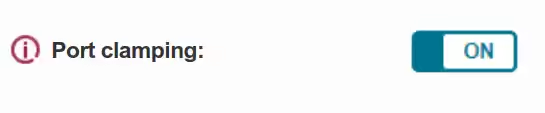
If you have a PlusNet router, you can find the setting here: http://192.168.1.254/broadband.htm then press VPN option.
To fix the Google VPN, the router setting you need to change is 'Port Clamping to ON.' If the port clamping is off, switch it on. If it's already on, toggle it off/on. Save the setting and wait. The router may reboot or take a few seconds to reconfigure the port clamping setting you have enabled.
Working
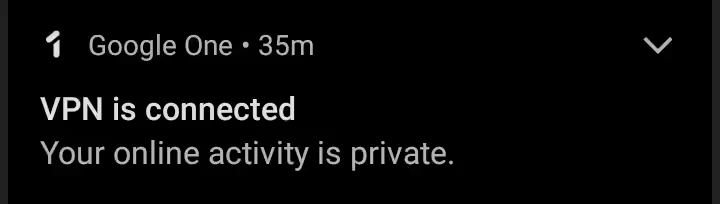
When the router is back online, and you have WiFi, do the testing again. Check if the Google One VPN will successfully connect to your WiFi. You should see the same 'Connected' message on WiFi as on the mobile data.
Is it not working?
Make sure you save the setting in the router. This may take an extra step to confirm the save. Return to the router and check that the port clamping setting is 'ON.'
If you still have VPN disconnects after the fix, try restarting the router to recreate the connection to the internet and kickstart the VPN.
Port Clamping
The solution is to use the port clamping setting in your router. This is what that settings does in the router:
This will set the internet key exchange to UDP port 500 rather than allowing a floating port - a setting sometimes required by older VPN clients to stay connected.
The evolution of mobile technology has been remarkable, and one of the key aspects of this evolution has been the development of different generations of mobile data networks. These networks have increased data transfer speeds and enabled various new applications and services. This article will explore the history of 2G, 3G, 4G, and 5G mobile data networks and their key dates.
1G Mobile Networks
1G delivered analogue voice only, no data and made its roots in the 1980s. Since the World Wide Web was not invented until 1989 (by Tim Berners-Lee, a British scientist), the lack of mobile data from the first generation of cellular networks wasn't an issue.
2G Mobile Networks
The second-generation (2G) mobile network was introduced in the 1990s, and it marked a significant step forward from the first-generation (1G) analogue networks. The 2G digital network-enabled mobile voice communication and provided basic data services such as SMS messaging.
One of the critical milestones in developing the 2G network was the introduction of the Global System for Mobile Communications (GSM) standard in 1991. This standard, developed by the European Telecommunications Standards Institute (ETSI), was a significant breakthrough in mobile communications. It allowed international roaming and offered better security and call quality than the earlier analogue networks.
GPRS
In the early 2000s, the 2G network underwent further development with the introduction of General Packet Radio Service (GPRS) technology. GPRS enabled packet-based data transmission, allowing always-on data connections and faster data transfer speeds.
3G Mobile Networks
The third-generation (3G) mobile network was introduced in the early 2000s and marked a significant step forward in mobile data transfer speeds. 3G networks enabled faster data transfer speeds, more reliable connections, and support for multimedia applications.
One of the key milestones in developing 3G networks was the introduction of the Universal Mobile Telecommunications System (UMTS) standard in 2001. UMTS significantly improved over the earlier 2G networks as it allowed for higher data transfer speeds, up to 2 Mbps, and supported advanced multimedia applications such as video calling and mobile TV.
Another significant development in the 3G era was the introduction of High-Speed Packet Access (HSPA) technology, which further improved data transfer speeds. HSPA allowed peak data transfer speeds of up to 14 Mbps, significantly improving over earlier 3G networks.
4G Mobile Networks
The fourth-generation (4G) mobile network was introduced in the late 2000s and early 2010s and represented a significant leap forward in mobile data transfer speeds. 4G networks enabled peak data transfer speeds of up to 100 Mbps and supported advanced multimedia applications such as ultra-high-definition video streaming.
Long-Term Evolution (LTE)
One of the key milestones in developing 4G networks was the introduction of Long-Term Evolution (LTE) technology in 2009. LTE significantly improved over earlier 3G networks, allowing peak data transfer speeds of up to 100 Mbps and providing better spectral efficiency, allowing more data to be transmitted over the same spectrum.
LTE Advanced (LTE-A)
Another significant development in the 4G era was the introduction of LTE Advanced (LTE-A) technology in June 2011, further improving data transfer speeds. LTE-A allowed peak data transfer speeds of up to 1 Gbps, significantly improving over earlier 4G networks.
5G Mobile Networks
The fifth-generation (5G) mobile network started to roll out in 2019 and is the latest generation of mobile networks. It represents a significant leap forward in mobile data transfer speeds and network capabilities. 5G networks are designed to enable peak data transfer speeds of up to 20 Gbps and support advanced applications such as virtual and augmented reality, autonomous vehicles, and smart cities.
5G New Radio (NR)
One of the key milestones in developing 5G networks was the release of the 5G New Radio (NR) standard in 2017.
Since the release of the 5G New Radio (NR) standard, there have been significant developments in 5G mobile networks. Some of the key developments include:
Network Deployments
Major mobile network operators worldwide have been rolling out 5G networks in the past few years. As of 2022, 5G networks are available in many countries, including the US, China, South Korea, Japan, and many European countries. The deployment of 5G networks has been a significant focus for mobile network operators as they seek to provide their customers with faster data speeds and better network capabilities.
Expansion of 5G Devices
Since the release of the 5G NR standard, there has been a steady increase in the number of 5G-enabled devices, including smartphones, tablets, and laptops. As of 2022, many major smartphone manufacturers, including Samsung, Apple, and Huawei, have released 5G-enabled smartphones. This has been a primary driver of adopting 5G networks as consumers seek faster data speeds and better network capabilities.
Development of 5G Infrastructure
The development of 5G infrastructure has been a key focus for many technology companies. In recent years, significant investment has been made in developing 5G base stations and other network infrastructure. These developments have been critical in enabling the deployment of 5G networks and improving network performance.
Advancements in Network Technology
In addition to deploying 5G networks, there have been significant advancements in 5G network technology. For example, there have been developments in the use of the millimetre-wave (mmWave) spectrum, which can enable even faster data speeds. There have also been advancements in network slicing, which allows mobile network operators to create multiple virtual networks within a single physical network. This technology can enable more efficient use of network resources and create specialized networks for different use cases.
Development of New Applications
One of the key drivers of 5G network development has been the potential to enable a range of new applications and services. In recent years, significant developments have been made in areas such as autonomous vehicles, smart cities, and virtual and augmented reality. These applications require high-speed and low-latency networks, which 5G can provide. As such, there has been significant investment in developing these new applications and services.
Overall, since the release of the 5G NR standard in 2017, there have been significant developments in 5G mobile networks. With the ongoing deployment of 5G networks, the expansion of 5G-enabled devices, and the development of new applications and services, 5G is set to transform how we communicate and interact with technology in the future.
Future of 5G
More cell sites need to be installed to get any real benefit for most people. Until there is a reliable and local 5G tower, consumers will be unwilling to spend more for a 5G phone. 2022 sales of 5G-capable smartphones reached 51% globally, representing the first time it exceeded that of 4G smartphones. But still shows a slow take-up of the 5G enabled handsets. 5G network providers cite automotive uses and IoT devices needing the new networks, but the phones make 5G investment worthwhile for the network providers.
Security of 5G will come under scrutiny, and newer iterations of 5G will be issued in the name of speed or reliability. Still, they will also fix security problems found in the networks.
6G Mobile Networks
As we outgrow the limitations of 5G, as we have done with all the previous generations, the next step will be deploying 6G mobile networking. This will be more reliable, faster, and have better coverage and will fit into even more devices in our environment than ever before. 6G is currently in a quiet development but is held back by the need to get 5G fully rolled out and the newer technology required to get 6G working outside of a lab.