

Free images tag: Mobile
SMARTY mobile service can give you this apologetic, yet unhelpful recorded message repeatedly if you use their service.
SIMS
It can be possible to make a call to the same number from a different number, even from the same phone using a different SIM. Dual SIMS works well for this, but just a friend's phone is useful to prove the problem is with SMARTY and not the number or the phone.
Testing
But, is it? Are you sure you are testing the number? Typing the same number into two different phones, one that gives a recorded message 'Sorry, you have not been given access to this service' (SMARTY) and the other that connects the call would make you think there is a problem with SMARTY being unable to connect the call.
Connect
One network will connect the call while another doesn't. What gives?
The problem is the message is misleading. 'You have not been given access to this service' indicates a restriction on your account, like a premium rate or non-geographical restriction. The help will suggest adding credits for out-of-plan calls. But a better message could be 'Uncable to connect the call'
The new message would lead you to double-check the number and confirm it with the contact or even Google search.
We found our SMARTY was not connected to the caller and we got the recorded announcement 'Sorry, you have not been given access to this service' when there were too many digits on the phone number.
But why would the call connect on GIFFGAFF?
The phone number has two additional digits at the end of the number, these are rejected by giffgaff anf the call is connected. SMARTY will take the complete number, including any additional digits, and fail the call with an apology.
Luckily, the additional digits were at the end of the number and not anywhere else, which would have caused a wrong number for any network provider.
Advice
Check that the number has the correct number of digits and don't read too much into the message from SMARTY 'Sorry, you have not been given access to this service' because it may be misleading you. Check the number is correct, there are no additional digits that upset SMARTY (but others ignore them).
Conclusion
SMARTY handles errors in numbers differently than other operators. The message you hear may be misleading you. Double-check and check again the number you are dialing. Any error can give you this anncoucment.
AI Bots Scraping your Content?
Search Engines July 6, 2024 0
What is GoogleOther and why does it visit my website?
Mozilla/5.0 (Linux; Android 6.0.1; Nexus 5X Build/MMB29P) AppleWebKit/537.36 (KHTML, like Gecko) Chrome/125.0.6422.175 Mobile Safari/537.36 (compatible; GoogleOther)The User-agent with GoogleOther, from AS15169 GOOGLE, looks like it is one of those Google bots you should welcome to your site?
AS15169 GOOGLE
A Google-owned block that can source official Google traffic, but why are they not using their usual Google/bot UA?
Because this is no ordinary bot, well it is, but what happens to the pages the GoogleOther bot scrapes from your site?
AI LLM
Google is in the race to build large language modes for their AI bots and the language comes from your website. The GoogleOther bot scrapes your site for inclusion into its Bard or whatever LLM they are building next.
Block
There is no legitimate need for GoogleOther to visit your site; this is not any of the usual Google indexing bots they use to run their Google search engine.
Unlock the Power of Smart Metering: A Closer Look at the Future of Energy Management
Some Acronyms
IHD - In-Home Display (like the Trio 3)
WAN - Wide Area Network (like the Internet)
HAN - Home Area Network (like Zigbee)
DCC - Data and Communications Company (like a Coordinator)
SMETS1 - Smart Metering Equipment Technical Specifications (Version 1)
SMETS2 - Smart Metering Equipment Technical Specifications (Version 2)
Interconnected
Imagine a world where your energy consumption is no longer a mystery, where you're not just a passive consumer but an active participant in the energy ecosystem. Welcome to the realm of smart metering, a dynamic duo of innovations that brings your energy usage to life and bridges the gap between you and your energy supplier like never before. Let's embark on a journey through the heart of this groundbreaking system, where two interconnected marvels, the Home Area Network, and the Wide Area Network, pave the way for a brighter, more efficient future.
Home Area Network: Where Your Energy Story Begins
Step into the Home Area Network (HAN), an ingenious cornerstone within your abode's walls. Think of it as the beating heart of the smart metering revolution entrusted to the care of your energy supplier. Nestled within this network are the remarkable smart meters, the in-home display acting as your energy interpreter, and the communication hub – your home's energy command center.
Picture this hub as a vibrant energy orchestra conductor orchestrating a symphony of data flows. Like diligent messengers, your smart meters wirelessly transmit vital energy insights to this hub. And like magic, the hub dispatches this treasure trove of information to your in-home display and energy supplier. It's a dance of connectivity that transforms mere data into actionable wisdom.
A cable connects hub SEAP-2001-V to the Electricity meter and wirelessly to the local HAN network for the Gas Meter and the WAN for DDC meter readings.
The GAS meter sends its readings over the HAN to the HUB for forwarding over the LAN to the DCC for onward transmission to the billing company. The IHD picks up the meter readings from the HUB over the HAN for local convenient display for the customer.
But here's the twist: harmony is disrupted if the Home Area Network falters. Smart meters lose their voice, and the in-home display falls silent. The vital conversation between you and your energy supplier stutters. It's a reminder of the intricate ballet that powers this new-age relationship.
Wide Area Network: Where Conversations Transcend Boundaries
As we journey beyond the confines of our homes, we encounter the Wide Area Network (WAN), an expansive realm that bridges gaps and brings the world of smart metering to life on a grand scale. Imagine it as a vast web of communication threads spanning across cities and landscapes, uniting smart meters and energy suppliers in a seamless conversation.
This grandeur exchange occurs over a secure network reminiscent of the technology behind our trusty mobile phones. And at the heart of this exchange lies the communications hub, a master connector between the intimate Home Area Network and the sprawling Wide Area Network. When all is well in this realm, the dialogue between smart meters and suppliers flows effortlessly, enriching both sides with valuable insights.
If you live in a weak 4G signal area, the WAN can fail to connect to the network, and meter readings are not transmitted to the billing companies. You may find an 'aerial extension' from the HUB installed to reach a more reliable or stronger 4G from the WAN connection.
Yet, just as nature has its storms, so does technology. When the Wide Area Network faces turbulence, the symphony of communication falters. Smart meters lose their voice, and the vibrant exchange with suppliers quietens. It's a reminder of the delicate equilibrium that fuels this dynamic conversation.
The Marvel of Evolution: From Third-Party to National Network
In this saga of innovation, we encounter a fascinating evolution in the realm of communications networks. In the early chapters, third-party networks took center stage, enabling the magic of smart meters to touch our lives. Then, a purpose-built national communications network emerged with a flourish, an architectural marvel sculpted by the Data and Communications Company (DCC). This new era promised even greater wonders.
Yet, like all great transformations, the transition wasn't without its challenges. The national network, while potent, wasn't ready when the smart meter wave began. To ensure you could experience the marvels of smart meters, energy suppliers harnessed the power of third-party networks. First-generation smart meters danced to the tune of these networks, sharing their insights with suppliers.
Enter the second generation, donning the cloak of progress. These smart meters seamlessly embraced the purpose-built national network, painting a portrait of connectivity unparalleled in its elegance. But there's a catch: the tale of the SMETS1 meters, their magic bound to a single supplier. When the supplier changes, the magic dims, and the meters are in a "dumb" slumber. Yet fret not for the Data and Communications Company toils to awaken these slumbering sentinels, ensuring compatibility with all suppliers in a symphony of phases.
As we close this chapter, we stand on the precipice of a new dawn in energy management. Smart metering, with its twin enigmas of Home Area Network and Wide Area Network, promises a future where energy is no longer a mystery but a symphony of understanding. It's a dance of data, a connectivity conversation, and an ode to progress. So, embrace the magic, for the journey has only just begun.
Conclusion
Smart Metering Equipment Technical Specifications Version 1 (SMETS1 meters) are limited to a single, original energy company with attempts made to remotely convert them to the SMETS2 version, not all of which are successful.

SM1 on the body of the energy meter identifies it as a SMETS1 Meter.
Smart Metering Equipment Technical Specifications version 2 (SMETS2 meters) are a universal meter connection that connects to DCC and is not limited to a single energy supplier. All new Smart Meters are SMETS2.
And will it help me with SEO for my site?
An "About Me" page can be important for SEO (Search Engine Optimization) and overall website performance. Here are some reasons why:
Relevance and Trustworthiness
Search engines, like Google, aim to provide users with relevant and trustworthy results. An "About Me" page provides essential information about the website owner or the team behind the website. This information helps establish credibility and trust with visitors and search engines alike.
Content for Search Engines
Search engines favor websites with valuable and relevant content. An "About Me" page can provide unique content that describes the website's purpose, mission, and values. This relevant content on your site can positively influence your rankings in search engine results.
Keyword Opportunities
When creating an "About Me" page, you can naturally incorporate relevant keywords related to your website's niche or industry. This can help improve the page's visibility in search results for those particular keywords.
User Engagement and Experience
A well-crafted "About Me" page can engage visitors and encourage them to spend more time on your website. This increased user engagement signals to search engines that your website is valuable and relevant, potentially improving rankings.
Backlink Attraction
An "About Me" page can also attract backlinks from other websites. High-quality backlinks from reputable sources are essential for SEO as they indicate to search engines that your website is authoritative and worth ranking higher.
Navigational and Indexing Importance
An "About Me" page makes your website more user-friendly and easier to navigate. Search engine crawlers also use internal links to discover and index content on your website. An "About Me" page with internal links to other essential pages on your site can help search engines find and index those pages more effectively.
Factors
However, it's essential to remember that while an "About Me" page can positively impact your SEO efforts, it's just one of many factors that influence search engine rankings. To achieve strong SEO performance, create high-quality, relevant, and valuable content across your website, including the "About Me" page. Additionally, ensure your website's technical aspects, such as site speed, mobile-friendliness, and proper use of meta tags, are optimized for search engines.
Google VPN is not Connecting (fix).
Technology July 11, 2023 0
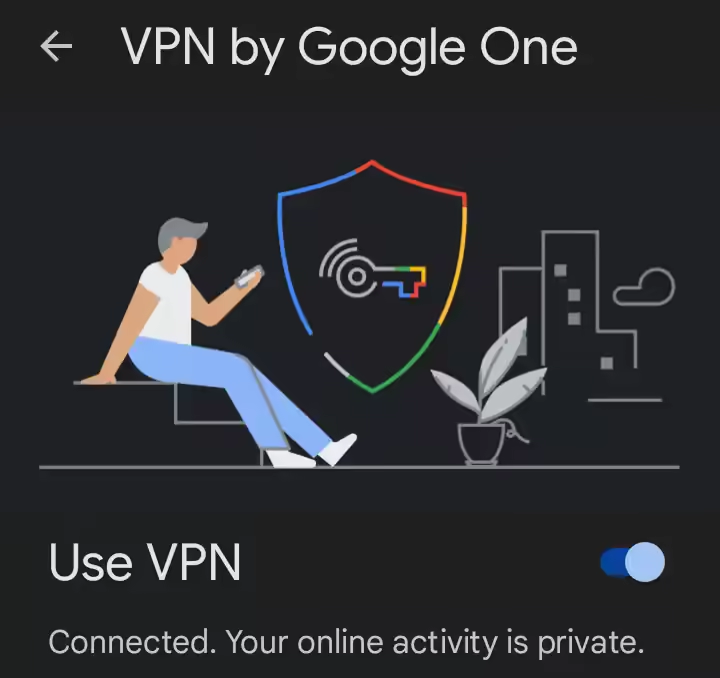
VPN by Google One can encrypt and secure your internet traffic by using the Google Virtual Private Network to connect your phone to the internet.
One problem with the Google VPN is that it keeps disconnecting or won't connect. Sometimes it connects, and other times it won't. It is frustrating to have a paid service that just isn't reliable. With all this technology, why can Google make their VPN work properly? We have the fix for that.
Testing
There is a solution, but you can do some testing first to ensure the Google One VPN fix will suit your disconnecting problem.
Firstly
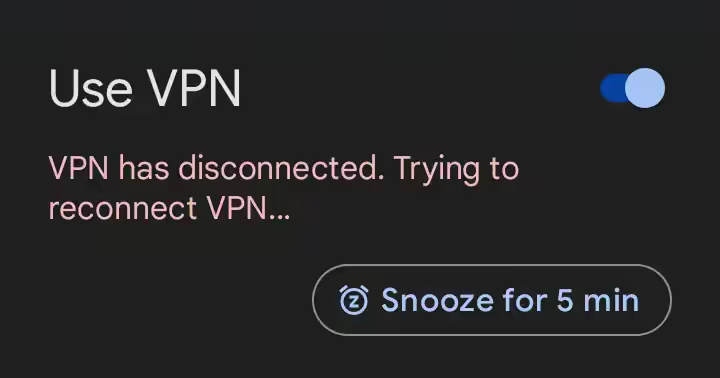
Test the VPN on WiFi only.
Switch off Mobile Data and see if the Use VPN gives you the 'Connected. Your online activity is private.' message.
You will expect to see a static 'VPN is connecting...' and the red failure message 'VPN has disconnected and trying to reconnect VPN...' in a constant loop.
Secondly
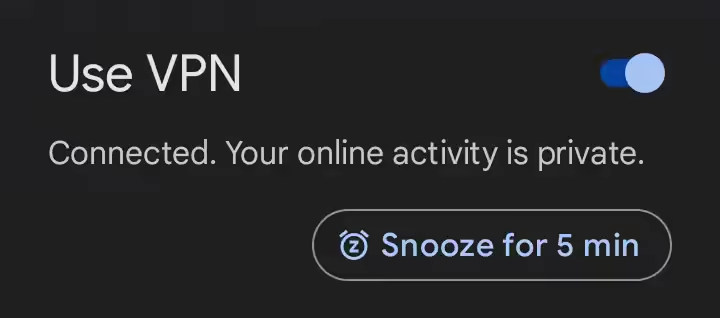
Test the VPN on Mobile Data only.
Switch off WiFI and see if the Use VPN gives you the 'Connected. Your online activity is private.' message.
At this point, it gets exciting if you do see the 'Connected. Your online activity is private.' message.
You think the problem may be solved, and the Google VPN now protects your internet.
Well, your VPN is working, but switch back to wifi only again and see the cycle of the VPN not working on wifi but working on mobile data (3G/4G/5G). This indicates the home router is the problem in this instance.
If your VPN works on mobile data but fails to connect when on WiFi, you can be quite confident that the home router is the problem and this solution will work for you.
Router
Most home routers have an additional setting, the web administration interface, often found at http://192.168.1.1 or http://192.168.1.254, but you can often find the router's address on the back or underside of it. Whatever the router's address, you need to log into the router with the username and password to change the settings. Your ISP could help you with this, particularly if they supplied your home router as part of the broadband package.
Settings

If you have a PlusNet router, you can find the setting here: http://192.168.1.254/broadband.htm then press VPN option.
To fix the Google VPN, the router setting you need to change is 'Port Clamping to ON.' If the port clamping is off, switch it on. If it's already on, toggle it off/on. Save the setting and wait. The router may reboot or take a few seconds to reconfigure the port clamping setting you have enabled.
Working

When the router is back online, and you have WiFi, do the testing again. Check if the Google One VPN will successfully connect to your WiFi. You should see the same 'Connected' message on WiFi as on the mobile data.
Is it not working?
Make sure you save the setting in the router. This may take an extra step to confirm the save. Return to the router and check that the port clamping setting is 'ON.'
If you still have VPN disconnects after the fix, try restarting the router to recreate the connection to the internet and kickstart the VPN.
Port Clamping
The solution is to use the port clamping setting in your router. This is what that settings does in the router:
This will set the internet key exchange to UDP port 500 rather than allowing a floating port - a setting sometimes required by older VPN clients to stay connected.
How do I download the ChatGPT App?
LLM Chat Bot July 9, 2023 0
ChatGPT is a great app; how do you download it to your phone? Can you install the app on Apple or Android, and if so, where is the app?
Has ChatGPT been taken off the app stores, and why?
Apps
Apps are great; the program is right in your pocket. There is an app for virtually everything, so why is it so difficult to find the chatGPT app? Anyone who whats to try the new generative AI ChatGPT service on their laptop visits the website, signs in and off you go. But what about all the people that want to use their phones to use ChatGPT? Why can't the app be found, not even a .apk file to download from a different app store?
No Apps
Surprisingly there is NO APP currently made (or expected to be made) by open.Ai for their ChatGPT bot. This is not an attempt to restrict access to ChatGPT or any threat by the EU at shutting down ChatGPT; it's just that there is no need for an app.
Mobile ChatGPT
So how do you get ChatGPT on your mobile? The solution is simpler than you may imagine.
Visit https://chat.openai.com
Save the link to your desktop by tapping the three dots and choosing 'Add to home screen and for iPhone users, tap 'Share' and 'Add to Home Screen.'
This will put a link to ChatGPT on your desktop; tap and it will automatically open your browser and load the ChatGPT sign-in page. Sign in and start chatting.
Simple
The simple interface on mobile is easy to use, and an app wouldn't enhance the experience when a cross-device mobile page is perfect for the job.
There was never a Chat GPT app that has been taken down, you have not had your account blocked from getting the ChatGPT app, and the EU have not overreached and overreacted to AI and blocked the mobile app.
From the AI Chat
How do I get the ChatGPT app to download?
ChatGPT:
As an AI language model, I don't have direct control over the availability or distribution of specific applications. However, if you're looking for a way to interact with the GPT-3.5 model, you may need to explore platforms or services that provide access to it. OpenAI offers an API that developers can use to integrate GPT-3.5 into their own applications or services.
To use GPT-3.5, you would typically need to be a developer or have some programming knowledge. You can visit the OpenAI website (https://openai.com/) to learn more about their API, documentation, and any available resources or tools to help you get started.
If you're specifically looking for an app that uses ChatGPT or a similar AI model, you can check various app marketplaces, developer forums, or AI-focused communities to see if any developers have created such an app. Keep in mind that as an AI model, I don't have real-time information on the latest app developments, so it's always a good idea to do some research or seek advice from relevant communities.
chat.openai.com
In today's digital age, online privacy is a significant concern for many individuals. We use the Internet for various purposes, such as shopping, communication, and entertainment. However, every online activity we undertake leaves a trail which can be traced back to us. One of the most commonly used methods of tracking users online is browser fingerprinting.
This blog post will dive deep into browser fingerprinting, what it is, how it works, where it is used, and why.
What is browser fingerprinting?
Browser fingerprinting is collecting and analyzing information about a user's web browser configuration to create a unique identifier for that user. The information collected includes the user's browser type, version, language, operating system, screen resolution, plugins, fonts, and other settings. Combined, these factors can create a unique fingerprint that identifies the user's device and, ultimately, the user.
How does browser fingerprinting work?
Browser fingerprinting collects information about the user's web browser and analyses it to create a unique identifier. The process involves using JavaScript code embedded in a website or advertisement to collect user browser configuration information. This information is then sent back to the server, which is analyzed and compared to other fingerprints to determine if the user has been previously identified.
10 Browser fingerprinting factors
Many factors can be used to create a browser fingerprint, but some of the most commonly used factors include the following:
- User Agent: The user agent string provides information about the user's browser, including its type, version, and operating system.
- Screen Resolution: The screen resolution of the user's device can provide a unique identifier, as not all devices have the same screen resolution.
- Browser Plugins: The plugins installed on a user's browser can provide information about the user's interests and online activities.
- Timezone: The timezone can provide information about the user's location, which can be used to tailor ads or content to the user's region.
- Fonts: The fonts installed on a user's device can be used to create a unique identifier, as not all devices have the same fonts.
- Language: The language settings of a user's browser can provide information about their location and language preferences.
- IP Address: The user's IP address can be used to identify their general location and can be used to link multiple browser fingerprints to the same user.
- WebGL: WebGL provides information about the user's graphics card, which can be used to create a unique identifier.
- Canvas: The Canvas API can create a unique identifier by measuring how a user's browser draws a particular image.
- Cookies: While cookies can be deleted or blocked by the user, they can still be used to create a browser fingerprint.
Where is browser fingerprinting used?
Various entities use browser fingerprinting to track users' online activities. This includes advertisers, who use it to target ads to specific users based on their interests and preferences. Governments and law enforcement agencies also use browser fingerprinting to track and identify individuals engaging in illegal activities online. Websites may also use browser fingerprinting to prevent fraud and ensure the security of their platform.
Why is browser fingerprinting used?
Browser fingerprinting is used for several reasons, primarily to track users' online activities. Advertisers use this information to deliver personalized ads to users, which can result in increased revenue. Law enforcement agencies use browser fingerprinting to track and identify individuals who may be involved in illegal activities, such as fraud or terrorism. Websites may use browser fingerprinting to prevent fraud and protect their users' data.
Browser fingerprinting is a highly effective tracking method that is difficult to block or prevent. Unlike cookies, which users can delete or block, browser fingerprints cannot be easily erased or manipulated. This means that users can be tracked even if they have taken steps to protect their privacy, such as using a virtual private network (VPN) or disabling cookies.
EFF
According to an Electronic Frontier Foundation (EFF) study, approximately 84% of browsers have unique fingerprints. The study analyzed the fingerprints of over one million devices and found that each had an average of 18.1 bits of identifying information. A user's online activities will likely be tracked and identified using browser fingerprinting.
The EFF study also found that browser fingerprinting is becoming more prevalent, with more websites and advertisers using it to track users. This is due to the increased use of mobile devices and the limitations of traditional tracking methods, such as cookies. Browser fingerprinting is also more accurate than other tracking methods, as it can identify users across multiple devices and browsers.
Protection
So, what can users do to protect their privacy from browser fingerprinting? One option is to use privacy-focused browsers that block or limit browser fingerprinting. These browsers use various techniques to prevent fingerprinting, such as blocking third-party cookies, disabling JavaScript, and limiting plugin access. Another option is to use browser extensions that block or limit fingerprinting. Some popular extensions include Privacy Badger, uBlock Origin, and NoScript.
Conclusion
In conclusion, browser fingerprinting is a highly effective tracking method that is difficult to block or prevent. Various entities use it to track users' online activities, including advertisers, governments, and websites. While it is used for legitimate purposes, such as preventing fraud and ensuring security, it can also be used for more nefarious purposes, such as monitoring individuals without their consent.
As individuals, there are steps we can take to protect our privacy from browser fingerprinting. Using privacy-focused browsers and browser extensions can limit or prevent browser fingerprinting. Additionally, being mindful of the information we share online and regularly clearing our browsing history can help protect our privacy.
It is also important for website owners and advertisers to be transparent about their use of browser fingerprinting and to provide users with opt-out options. This can help to build trust and protect user privacy.
Summary
In summary, browser fingerprinting is a powerful tool for tracking users' online activities, and its prevalence is increasing. While it has legitimate uses, it can also be used to infringe on individuals' privacy rights. Individuals, website owners, and advertisers need to protect their privacy and be transparent about their use of browser fingerprinting. By working together, we can ensure the Internet remains safe and secure for all users.
When your WordPress bullet point list looks too close together, the gap between entries must be expanded.
Having some space above and below each bullet point can make the page much easier to read and set each point apart from its neighbours.
It is quite a simple edit to make every bullet point list have a bit more breathing room, and you can fine-tune the breathing space each bullet point entry can have.
CSS
WordPress has a simple way to add CSS edits. These edits can be very powerful in altering the look and feel of your website. You can adjust with CSS, from colours to fonts to any element on the screen.
The CSS you need to make some space between the bullet point lists is:
.entry-content ul li {
    margin-bottom: 20px;
}
A straightforward bit of code can make a difference to your site. Easier to read the bullet point makes for happier visitors, and you get your point across better.
WordPress
To add the custom CSS to your WordPress, navigate the many to Appearance, then to Customize. from there, look for the Additional CSS menu. Click that to open the edit section. Paste the code above into the Customizing Additional CSS empty section. If some code is already in there, add it below the existing CSS edit.
Themes
Your theme will have a custom CSS entry section if the standard WordPress custom CSS isn't there or doesn't function. Check the theme control panel or help page for Custom CSS.
Adjustment
Change the number of px to adjust the spacing.
OK, maybe px is not ideal for a responsive world, so be free to edit the units if the mobile site looks bad but good on the desktop after testing. Let us know in the comments your enhancements to the solution above.
The evolution of mobile technology has been remarkable, and one of the key aspects of this evolution has been the development of different generations of mobile data networks. These networks have increased data transfer speeds and enabled various new applications and services. This article will explore the history of 2G, 3G, 4G, and 5G mobile data networks and their key dates.
1G Mobile Networks
1G delivered analogue voice only, no data and made its roots in the 1980s. Since the World Wide Web was not invented until 1989 (by Tim Berners-Lee, a British scientist), the lack of mobile data from the first generation of cellular networks wasn't an issue.
2G Mobile Networks
The second-generation (2G) mobile network was introduced in the 1990s, and it marked a significant step forward from the first-generation (1G) analogue networks. The 2G digital network-enabled mobile voice communication and provided basic data services such as SMS messaging.
One of the critical milestones in developing the 2G network was the introduction of the Global System for Mobile Communications (GSM) standard in 1991. This standard, developed by the European Telecommunications Standards Institute (ETSI), was a significant breakthrough in mobile communications. It allowed international roaming and offered better security and call quality than the earlier analogue networks.
GPRS
In the early 2000s, the 2G network underwent further development with the introduction of General Packet Radio Service (GPRS) technology. GPRS enabled packet-based data transmission, allowing always-on data connections and faster data transfer speeds.
3G Mobile Networks
The third-generation (3G) mobile network was introduced in the early 2000s and marked a significant step forward in mobile data transfer speeds. 3G networks enabled faster data transfer speeds, more reliable connections, and support for multimedia applications.
One of the key milestones in developing 3G networks was the introduction of the Universal Mobile Telecommunications System (UMTS) standard in 2001. UMTS significantly improved over the earlier 2G networks as it allowed for higher data transfer speeds, up to 2 Mbps, and supported advanced multimedia applications such as video calling and mobile TV.
Another significant development in the 3G era was the introduction of High-Speed Packet Access (HSPA) technology, which further improved data transfer speeds. HSPA allowed peak data transfer speeds of up to 14 Mbps, significantly improving over earlier 3G networks.
4G Mobile Networks
The fourth-generation (4G) mobile network was introduced in the late 2000s and early 2010s and represented a significant leap forward in mobile data transfer speeds. 4G networks enabled peak data transfer speeds of up to 100 Mbps and supported advanced multimedia applications such as ultra-high-definition video streaming.
Long-Term Evolution (LTE)
One of the key milestones in developing 4G networks was the introduction of Long-Term Evolution (LTE) technology in 2009. LTE significantly improved over earlier 3G networks, allowing peak data transfer speeds of up to 100 Mbps and providing better spectral efficiency, allowing more data to be transmitted over the same spectrum.
LTE Advanced (LTE-A)
Another significant development in the 4G era was the introduction of LTE Advanced (LTE-A) technology in June 2011, further improving data transfer speeds. LTE-A allowed peak data transfer speeds of up to 1 Gbps, significantly improving over earlier 4G networks.
5G Mobile Networks
The fifth-generation (5G) mobile network started to roll out in 2019 and is the latest generation of mobile networks. It represents a significant leap forward in mobile data transfer speeds and network capabilities. 5G networks are designed to enable peak data transfer speeds of up to 20 Gbps and support advanced applications such as virtual and augmented reality, autonomous vehicles, and smart cities.
5G New Radio (NR)
One of the key milestones in developing 5G networks was the release of the 5G New Radio (NR) standard in 2017.
Since the release of the 5G New Radio (NR) standard, there have been significant developments in 5G mobile networks. Some of the key developments include:
Network Deployments
Major mobile network operators worldwide have been rolling out 5G networks in the past few years. As of 2022, 5G networks are available in many countries, including the US, China, South Korea, Japan, and many European countries. The deployment of 5G networks has been a significant focus for mobile network operators as they seek to provide their customers with faster data speeds and better network capabilities.
Expansion of 5G Devices
Since the release of the 5G NR standard, there has been a steady increase in the number of 5G-enabled devices, including smartphones, tablets, and laptops. As of 2022, many major smartphone manufacturers, including Samsung, Apple, and Huawei, have released 5G-enabled smartphones. This has been a primary driver of adopting 5G networks as consumers seek faster data speeds and better network capabilities.
Development of 5G Infrastructure
The development of 5G infrastructure has been a key focus for many technology companies. In recent years, significant investment has been made in developing 5G base stations and other network infrastructure. These developments have been critical in enabling the deployment of 5G networks and improving network performance.
Advancements in Network Technology
In addition to deploying 5G networks, there have been significant advancements in 5G network technology. For example, there have been developments in the use of the millimetre-wave (mmWave) spectrum, which can enable even faster data speeds. There have also been advancements in network slicing, which allows mobile network operators to create multiple virtual networks within a single physical network. This technology can enable more efficient use of network resources and create specialized networks for different use cases.
Development of New Applications
One of the key drivers of 5G network development has been the potential to enable a range of new applications and services. In recent years, significant developments have been made in areas such as autonomous vehicles, smart cities, and virtual and augmented reality. These applications require high-speed and low-latency networks, which 5G can provide. As such, there has been significant investment in developing these new applications and services.
Overall, since the release of the 5G NR standard in 2017, there have been significant developments in 5G mobile networks. With the ongoing deployment of 5G networks, the expansion of 5G-enabled devices, and the development of new applications and services, 5G is set to transform how we communicate and interact with technology in the future.
Future of 5G
More cell sites need to be installed to get any real benefit for most people. Until there is a reliable and local 5G tower, consumers will be unwilling to spend more for a 5G phone. 2022 sales of 5G-capable smartphones reached 51% globally, representing the first time it exceeded that of 4G smartphones. But still shows a slow take-up of the 5G enabled handsets. 5G network providers cite automotive uses and IoT devices needing the new networks, but the phones make 5G investment worthwhile for the network providers.
Security of 5G will come under scrutiny, and newer iterations of 5G will be issued in the name of speed or reliability. Still, they will also fix security problems found in the networks.
6G Mobile Networks
As we outgrow the limitations of 5G, as we have done with all the previous generations, the next step will be deploying 6G mobile networking. This will be more reliable, faster, and have better coverage and will fit into even more devices in our environment than ever before. 6G is currently in a quiet development but is held back by the need to get 5G fully rolled out and the newer technology required to get 6G working outside of a lab.
Years 2013 to 2022 for mobile search traffic vs desktop-based searches show a clear tipping point in 2017 when the desktop lost its crown and mobile became king.
| Year | Mobile | Desktop |
| 2013 | 16.2% | 83.8% |
| 2014 | 23.4% | 76.6% |
| 2015 | 33.4% | 66.6% |
| 2016 | 43.6% | 56.4% |
| 2017 | 50.3% | 49.7% |
| 2018 | 58.2% | 41.8% |
| 2019 | 63.4% | 36.6% |
| 2020 | 68.1% | 31.9% |
| 2021 | 72.6% | 27.4% |
| 2022 | 76.9% | 23.1% |
10 Years Rise
Over the last decade, the rise of mobile devices has revolutionized how people access the internet, significantly impacting search behaviour. With more and more people turning to their smartphones and tablets to browse the web, search engines have had to adapt to this shift in consumer behaviour.
According to the data above, mobile usage has steadily increased over the past 10 years, with desktop usage declining as a result. In 2013, only 16.2% of internet users accessed the web via mobile devices, compared to 83.8% who used desktops. Fast forward to 2022, and mobile usage has grown to 76.9%, while desktop usage has dropped to just 23.1%. We expect desktop usage to drop further from 2023 to 2024 and beyond as mobile increases its dominance.
Convenience
One reason for this shift in usage is the convenience and portability of mobile devices. With the ubiquity of smartphones and tablets, people can access the internet wherever and whenever they want, whether they're on the go or sitting on the couch. Mobile devices have also become more powerful and versatile, with larger screens and more advanced capabilities, making them ideal for browsing and searching the web.
An app for that
Another factor driving the rise of mobile usage is the growth of mobile apps. Many businesses now have dedicated mobile apps that allow customers to access their products and services from their smartphones or tablets. This has made it easier for people to shop, book appointments, and access information on the go, further reinforcing the trend towards mobile search.
SEO
The rise of mobile search has had a significant impact on search engine optimization (SEO). In the early days of SEO, desktop optimization was the focus, as most users were accessing the web via desktops. However, as mobile usage has grown, so has the importance of mobile optimization.
Mobile optimization involves tailoring websites and content to be easily accessible and user-friendly on mobile devices. This includes using responsive design to ensure that websites adjust to different screen sizes, optimizing page load times, and using mobile-friendly formats for images and videos.
Mobile-friendly update
Search engines have also adapted to the rise of mobile search by prioritizing mobile-friendly content in their search results. In 2015, Google introduced a mobile-friendly update that prioritized mobile-optimized websites in its search results, penalizing sites that were not mobile-friendly. This put pressure on businesses to optimize their websites for mobile devices or risk losing visibility in search results.
Voice Search
Another significant impact of mobile search is the rise of voice search. With the proliferation of virtual assistants like Siri and Alexa, more and more people are using voice search to access information on their mobile devices. Voice search is typically more conversational than typed search, with users asking questions rather than typing in keywords. This has led to the rise of long-tail keywords, which are more specific and conversational in nature than traditional keywords.
The rise of voice search has also had an impact on local search. With people using their mobile devices to search for local businesses and services, local SEO has become more important than ever for bricks and mortar stores. Local SEO involves optimizing a website and its content for location-based searches, using keywords and content that target specific geographical areas.
Mobile Optimization
As mobile usage continues to grow, it's clear that businesses must prioritize mobile optimization and mobile SEO if they want to remain visible and competitive in search results. With more and more people turning to their smartphones and tablets to access the web, businesses that fail to adapt risk being left behind.
Conclusion
In conclusion, the data above shows a clear trend towards mobile usage over desktop usage when it comes to accessing the internet. The rise of mobile devices and mobile apps, combined with the convenience and portability of mobile search, has significantly impacted search behaviour and SEO. As mobile usage continues to grow, businesses must prioritize mobile optimization and SEO to remain visible and competitive in search results.