
Free images tag: SEO
And will it help me with SEO for my site?
An "About Me" page can be important for SEO (Search Engine Optimization) and overall website performance. Here are some reasons why:
Relevance and Trustworthiness
Search engines, like Google, aim to provide users with relevant and trustworthy results. An "About Me" page provides essential information about the website owner or the team behind the website. This information helps establish credibility and trust with visitors and search engines alike.
Content for Search Engines
Search engines favor websites with valuable and relevant content. An "About Me" page can provide unique content that describes the website's purpose, mission, and values. This relevant content on your site can positively influence your rankings in search engine results.
Keyword Opportunities
When creating an "About Me" page, you can naturally incorporate relevant keywords related to your website's niche or industry. This can help improve the page's visibility in search results for those particular keywords.
User Engagement and Experience
A well-crafted "About Me" page can engage visitors and encourage them to spend more time on your website. This increased user engagement signals to search engines that your website is valuable and relevant, potentially improving rankings.
Backlink Attraction
An "About Me" page can also attract backlinks from other websites. High-quality backlinks from reputable sources are essential for SEO as they indicate to search engines that your website is authoritative and worth ranking higher.
Navigational and Indexing Importance
An "About Me" page makes your website more user-friendly and easier to navigate. Search engine crawlers also use internal links to discover and index content on your website. An "About Me" page with internal links to other essential pages on your site can help search engines find and index those pages more effectively.
Factors
However, it's essential to remember that while an "About Me" page can positively impact your SEO efforts, it's just one of many factors that influence search engine rankings. To achieve strong SEO performance, create high-quality, relevant, and valuable content across your website, including the "About Me" page. Additionally, ensure your website's technical aspects, such as site speed, mobile-friendliness, and proper use of meta tags, are optimized for search engines.
The Power of Choosing the Right Domain Extension: Why TLDs Matter
Introduction
In the vast digital landscape, domain names are virtual addresses for businesses and individuals, and they are the gateway to online visibility, brand recognition, and credibility. While many focus on choosing the perfect domain name, selecting the right top-level domain (TLD) is often overlooked. In this blog post, we'll explore why the correct TLD for a domain name is crucial and provide examples to highlight its significance.
Establishes Credibility
The TLD you choose can significantly impact the credibility and trustworthiness of your website. A relevant TLD that aligns with your industry or purpose can positively impact visitors. For example, a nonprofit organization can opt for a .org TLD, signifying its commitment to a cause. Similarly, educational institutions often utilize .edu or .ac.uk TLDs, lending them credibility in the academic realm.
Enhances Brand Identity
Your domain name is integral to your brand identity, and the right TLD can reinforce that identity. It helps communicate the nature of your website and can even differentiate you from competitors. Imagine a photography studio that secures a .photography TLD – it immediately conveys their specialization and creates a memorable brand association.
Boosts Local SEO
Choosing a country-specific TLD can be highly advantageous if you have a local business. For instance, a bakery in London can benefit from a .uk TLD, indicating its geographical relevance to search engines. This can improve local search rankings and increase visibility to potential customers in the targeted region.
Targets Specific Audiences
Certain TLDs cater to specific industries or communities, enabling you to reach your target audience directly. Let's say you run a tech startup and secure a .io TLD. This extension is popular among the tech community and can attract like-minded individuals who are more likely to engage with your content and offerings.
Protects Your Brand
Choosing the right TLD is crucial for brand protection and preventing cybersquatting or phishing attempts. By securing multiple TLDs related to your brand name, you can reduce the risk of others misusing your brand's identity. For example, if your brand is "XYZ," registering XYZ.com, XYZ.net, and XYZ.org helps safeguard your online presence.
Examples
Examples of Relevant TLDs
- .com - US-based or worldwide businesses
- .org - nonprofit organizations
- .edu and .ac.uk - educational institutions
- .photography - photography-related businesses
- .co.uk - United Kingdom-based businesses
- .io - technology and startup companies
You would want to consider the country-specific TLDs if you serve a specific country or your site has multiple language versions. For example, Canada's country code, top-level domain (ccTLD), is .ca, while the ccTLD for France is .fr. Picking the correct ccTLD for your site can give visitors greater confidence the site content will be tailored to their language.
Examples of suspicious TLDs:
- .rest - meaningless to most people what this would showcase
- .boston - limited to a few towns or cities of the world, very local and shortsighted
- .degree - used by many spammers and fake sites. I wonder why?
Conclusion
Every element counts when establishing a strong online presence, and selecting the right TLD is essential to that process. The correct TLD improves credibility, enhances brand identity, boosts local SEO, targets specific audiences, and protects your brand. By carefully considering your industry, audience, and goals, you can choose a TLD that aligns with your objectives and maximizes the potential of your domain name.
Remember, the virtual world is vast, and your domain name is your beacon. Select the perfect TLD to confidently guide visitors to your digital doorstep and establish a strong online presence.
Choose wisely, and let your TLD become the building block of your online success!
Are you looking for a way to maximize your website's ad revenue without sacrificing user experience? Look no further than EZOIC.
EZOIC is an AI-driven platform that optimizes ad revenue and user experience for website owners. With their Ad Tester tool, you can automatically test and optimize ad placements, sizes, and types to increase revenue while ensuring a great user experience.
But that's not all. EZOIC's Site Speed Accelerator optimizes website speed to improve user experience and SEO ranking. At the same time, its Big Data Analytics suite provides insights and analytics on website performance, ad revenue, and user behavior.
With EZOIC, you'll have access to a suite of powerful tools that help you increase revenue and improve user experience, all backed by artificial intelligence and machine learning.
EZOIC offers easy integration with popular CMS platforms like WordPress, Joomla, and Drupal through their CMS Plugins, making it easy to get started and manage your ads.
If you're serious about maximizing your website's ad revenue while providing a great user experience, EZOIC is your platform. With a strong reputation in the industry and a track record of success, EZOIC is a trusted partner for website owners looking to improve their revenue and user experience.
Don't settle for mediocre ad revenue and a subpar user experience. Sign up for EZOIC today and take your website to the next level!
Keyword Analysis can help you find which key-words are working for your site. Armed with this information you can see who your competitors are, and how likely you are to beat them in the race for the top spot. Pick the easiest for you with the highest predicted traffic. Avoid going head-to-head with the competition, but make your own niche.
Niche
To conduct an SEO keyword analysis, you typically start by researching relevant keywords and phrases people search for in your industry or niche. You can use keyword research tools like Google Keyword Planner, SEMrush, Ahrefs, etc., to identify relevant keywords, their search volume, competition, and other metrics.
Prioritize
Once you have a list of keywords, you should prioritize them based on their relevance to your website and content, as well as their search volume and competition level. It would be best to consider the intent behind each keyword and whether it aligns with your website's content and goals.
Incorporating
After prioritizing your keywords, you can start incorporating them into your website's content, including page titles, meta descriptions, headers, and body text. However, using keywords naturally and not stuffing them into your content is essential, as this can harm your website's rankings and user experience.
Track
Finally, you should track your keyword rankings and adjust your SEO strategy based on your website's performance and user behaviour. SEO is an ongoing process, and you should continually refine your keywords and content to stay relevant and competitive.
Improving your SEO can help you rank more highly in the search results, bringing more clicks and more visitors to see your work.
Having a great website with useful and original, helpful content won't get the search engines excited without a good helping of SEO.
How to improve the SEO
We have listed 6 key items on the SEO list to focus your attention on ensuring your website is loved by the search engines as much as your visitors.
Optimize your website content.
Ensure your website has high-quality, unique, and relevant content related to your site's subject.
Use relevant keywords and phrases throughout your website content to make it easy for search engines to understand what your website is about. However, avoid keyword stuffing, which can negatively affect your website's ranking.
Improve website speed
A slow website can negatively impact your SEO. Use tools like Google PageSpeed Insights to test your website's speed and identify areas for improvement.
Use descriptive page titles and meta descriptions
Ensure that each page on your website has a unique and descriptive page title and meta description that accurately represents the content on that page. This will help search engines understand what your website is about and improve click-through rates.
Build quality backlinks
Backlinks from high-quality and relevant websites can help boost your website's authority and improve your search engine ranking. Contact other relevant websites and ask if they'd be willing to link to your website.
Utilize social media
Social media can be a powerful tool for promoting your website and building backlinks. Please share your website content on social media and engage with your followers to encourage them to share it.
Monitor your website analytics
Use tools like Google Analytics to track your website's traffic and identify areas for improvement. This will help you understand what content resonates with your audience and what areas of your website need optimization. Build on what works and expand on the topics that bring your visitors.
By following these six basic tips, you can improve the SEO of your website and increase your website's visibility to search engines.
Years 2013 to 2022 for mobile search traffic vs desktop-based searches show a clear tipping point in 2017 when the desktop lost its crown and mobile became king.
| Year | Mobile | Desktop |
| 2013 | 16.2% | 83.8% |
| 2014 | 23.4% | 76.6% |
| 2015 | 33.4% | 66.6% |
| 2016 | 43.6% | 56.4% |
| 2017 | 50.3% | 49.7% |
| 2018 | 58.2% | 41.8% |
| 2019 | 63.4% | 36.6% |
| 2020 | 68.1% | 31.9% |
| 2021 | 72.6% | 27.4% |
| 2022 | 76.9% | 23.1% |
10 Years Rise
Over the last decade, the rise of mobile devices has revolutionized how people access the internet, significantly impacting search behaviour. With more and more people turning to their smartphones and tablets to browse the web, search engines have had to adapt to this shift in consumer behaviour.
According to the data above, mobile usage has steadily increased over the past 10 years, with desktop usage declining as a result. In 2013, only 16.2% of internet users accessed the web via mobile devices, compared to 83.8% who used desktops. Fast forward to 2022, and mobile usage has grown to 76.9%, while desktop usage has dropped to just 23.1%. We expect desktop usage to drop further from 2023 to 2024 and beyond as mobile increases its dominance.
Convenience
One reason for this shift in usage is the convenience and portability of mobile devices. With the ubiquity of smartphones and tablets, people can access the internet wherever and whenever they want, whether they're on the go or sitting on the couch. Mobile devices have also become more powerful and versatile, with larger screens and more advanced capabilities, making them ideal for browsing and searching the web.
An app for that
Another factor driving the rise of mobile usage is the growth of mobile apps. Many businesses now have dedicated mobile apps that allow customers to access their products and services from their smartphones or tablets. This has made it easier for people to shop, book appointments, and access information on the go, further reinforcing the trend towards mobile search.
SEO
The rise of mobile search has had a significant impact on search engine optimization (SEO). In the early days of SEO, desktop optimization was the focus, as most users were accessing the web via desktops. However, as mobile usage has grown, so has the importance of mobile optimization.
Mobile optimization involves tailoring websites and content to be easily accessible and user-friendly on mobile devices. This includes using responsive design to ensure that websites adjust to different screen sizes, optimizing page load times, and using mobile-friendly formats for images and videos.
Mobile-friendly update
Search engines have also adapted to the rise of mobile search by prioritizing mobile-friendly content in their search results. In 2015, Google introduced a mobile-friendly update that prioritized mobile-optimized websites in its search results, penalizing sites that were not mobile-friendly. This put pressure on businesses to optimize their websites for mobile devices or risk losing visibility in search results.
Voice Search
Another significant impact of mobile search is the rise of voice search. With the proliferation of virtual assistants like Siri and Alexa, more and more people are using voice search to access information on their mobile devices. Voice search is typically more conversational than typed search, with users asking questions rather than typing in keywords. This has led to the rise of long-tail keywords, which are more specific and conversational in nature than traditional keywords.
The rise of voice search has also had an impact on local search. With people using their mobile devices to search for local businesses and services, local SEO has become more important than ever for bricks and mortar stores. Local SEO involves optimizing a website and its content for location-based searches, using keywords and content that target specific geographical areas.
Mobile Optimization
As mobile usage continues to grow, it's clear that businesses must prioritize mobile optimization and mobile SEO if they want to remain visible and competitive in search results. With more and more people turning to their smartphones and tablets to access the web, businesses that fail to adapt risk being left behind.
Conclusion
In conclusion, the data above shows a clear trend towards mobile usage over desktop usage when it comes to accessing the internet. The rise of mobile devices and mobile apps, combined with the convenience and portability of mobile search, has significantly impacted search behaviour and SEO. As mobile usage continues to grow, businesses must prioritize mobile optimization and SEO to remain visible and competitive in search results.
Is ChatGPT AI Bot Bad for Ranking?
LLM Chat Bot March 26, 2023 0
Getting to the top of google is the main goal for a website. Having new tools available like the AI powered Large Language Models like ChatGPT can help you move up the ranks.
If you thought your site would be instantly penalised by google for using a Chat bot like ChatGPT to create content then you may be surprised. Google doesn't care how the content was written. What google wants to see is good quality, unique, authoritative content, well presented and easy to access.
Its called EEAT - Expertise, Experience, Authoritativeness and Trustworthiness
If your AI ChatBot can churn out text that matches the EEAT experience and you can make it accessible then you will be golden. Have a good menu, alt text, H1, H2 schemes and all those SEO features to make it easy to find and read to get noticed.
Further reading provided by google is available on their site, here.
Bad Bots
The understanding that AI generated text is bad came from the past, before ChatGPT became common. Old style AI text generation was of very low quality, it didn't add to the site and was just used for keyword stuffing. This is a black hat SEO trick that fooled search engines into ranking the site higher than it is actually worth.
Good Bots
The quality of AI generated text from tools like Bard and ChatGPT are a world away from the old tools. These new AI Bots can make really good text that can actually pass as human written. If you give the AI the right prompts it can really improve on your original idea to make it more readable. Google wouldn't even know it was AI generated because the generated text can be of sufficient quality.
Errors
Watch out for errors in the AI LLM results. Having errors can affect your site because facts are key pillars of EEAT (Expertise, Experience, Authoritativeness and Trustworthiness). Proof reading is important to fact check, not so much typos, but the AI can 'Hallucinate' and create errors in your text.
ChatGPT
We invited ChatGPT to joins us in this post and asked it the question below:
write 300 words on how ChatGPT can write website content
As a language model trained on a massive corpus of text data, ChatGPT is well-equipped to write high-quality website content. With its vast knowledge of various fields, including technology, marketing, finance, and more, ChatGPT can create content that is not only informative but also engaging for readers.
One of the key advantages of using ChatGPT to write website content is its ability to generate text quickly and accurately. Whether you need product descriptions, landing pages, blog posts, or any other type of content, ChatGPT can produce it in a matter of seconds, saving you time and effort.
Moreover, ChatGPT can tailor the content to your specific needs, such as your brand voice, target audience, and SEO requirements. It can incorporate relevant keywords and phrases to improve your website's visibility in search engine rankings and help attract more traffic to your site.
Additionally, ChatGPT can provide a fresh perspective on your website content, bringing in new ideas and insights that you might not have considered before. With its natural language processing capabilities, it can understand the context of your business and industry, and produce content that resonates with your audience.
Furthermore, ChatGPT can also help you streamline your content creation process by automating repetitive tasks. For example, you can use ChatGPT to generate social media posts, email newsletters, or product descriptions in bulk, freeing up your time to focus on other aspects of your business.
In summary, ChatGPT can be a valuable asset to your content marketing strategy, helping you create high-quality, engaging, and SEO-friendly content quickly and efficiently. By leveraging the power of AI, you can elevate your website content and provide a better user experience for your audience.
https://chat.openai.com/chat
This passage took seconds for the AI to produce, much quicker than I can type.
Other Uses
While AI is often used for content creation it can also do many of the back office work. It is particularly good at coding and HTML/CSS.
Have a look at how ChatGPT wrote some basic CSS for us.
WordPress SEO checking tools can show 'Duplicate H1 tags'. Further investigation shows that the same H1 tag is used for page1/page2/page3 etc.
Duplicate H1
H1 is usually the site title and show the search engine what the most important part of the page is. This should be the top, the first paragraph of information should be the most relevant to the page title (H1) for maximum SEO effect.
Pagination
Pagination is the splitting up of many topics into manageable pages. WordPress can paginate the categories and tags. This pagination can make the page load more quickly because only a few previews of the tag or category are loaded for each page. But the problem is the same H1 tag is reused for every page.
Multiple H1
Having the same H1 on different pages gives the error of Duplicate H1 tags. The different pages are just the same category or tag list broken into pages, but it is still flagged as an SEO error. Thankfully its not a difficult fix if your theme supports it.
Fix for Duplicate H1
The fix for duplicate H1 on wordpress for category and tag pages can be achieved by adding a page number to the H1 description.
If you are using a TagDiv theme, like Newspaper you can find the setting in its template editor.
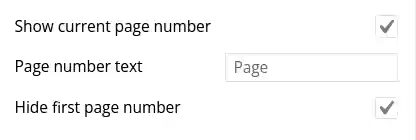
Three key settings will fix the duplicate H1 due to pagination in categories and they are:
- Show current page number
- Page number text
- Hide first page number
Show current page number (☑) will append the current page number to the H1 tag text. This makes each page to have a unique H1 text.
Page number text is for you to change if you don't want to add the word 'Page' to the H1. You may have already use the word 'page' and something different can fit better. You can just leave it as default.
Hide first page number is pretty neat. The fist page H1 won't be altered. Only page 2, 3 etc will show page number. This will leave your H1 exactly as you wanted it to be for the first page. Subsequent pages of the same category and tag will have page numbers appended.
You get unique H1 categories and tags in a few clicks. Job done.
Final
After saving the changes your category and tag titles will now look like:
- SEO Description H1
- SEO Description H1 - Page 1
- SEO Description H1 - Page 2
- SEO Description H1 - Page 3
- .....
You get a unique H1 tag for every category and tag page when they have been broken up into multiple pages for easier reading and quicker page loading.