

Free images tag: free
Understanding Password Leaks: What You Need to Know
Password leaks are a growing concern in today’s digital world, putting personal information and sensitive accounts at risk. In this blog post, we’ll explore what password leaks are, how they happen, and the steps you can take to protect yourself.
What is a Password Leak?
A password leak occurs when a database containing usernames and passwords is exposed, either due to a cyberattack, human error, or weak security measures. These leaks often result in credentials being sold or shared on the dark web, leading to unauthorized access to accounts.
Common Causes of Password Leaks
- Data Breaches: Hackers target organizations to steal user databases.
- Poor Security Practices: Weak encryption or lack of encryption makes it easier for attackers to access stored passwords.
- Phishing Attacks: Users are tricked into providing their passwords on fake websites.
- Insider Threats: Employees or contractors with access to sensitive information may accidentally or maliciously expose passwords.
How to Protect Yourself from Password Leaks
- Use Strong, Unique Passwords: Avoid using easily guessable passwords like “123456” or “password.” Make your passwords a mix of letters, numbers, and special characters.
- Enable Two-Factor Authentication (2FA): Adding an extra layer of security ensures that even if your password is leaked, your account is still protected.
- Regularly Change Passwords: Periodically update your passwords, especially for critical accounts like email and banking.
- Use a Password Manager: Password managers generate and store strong, unique passwords for each of your accounts, reducing the risk of reuse.
- Monitor Your Accounts: Use services like Have I Been Pwned to check if your email or passwords have been compromised in known leaks.
Using Have I Been Pwned
One of the easiest ways to check if your email or passwords have been compromised is by using Have I Been Pwned. This free service allows you to:
- Check if your email address has appeared in any known data breaches.
- Identify which websites or services were involved in the breach.
- Get notified when your information is found in a new breach.
To use Have I Been Pwned, simply visit their website, enter your email address, and review the results. If your information has been compromised, follow the recommended steps to secure your accounts.
What to Do If Your Password is Leaked
- Change Your Password Immediately: Update the affected account’s password and any other accounts where the same password was used.
- Enable 2FA if Not Already Done: This adds an extra layer of protection against unauthorized access.
- Monitor for Suspicious Activity: Keep an eye on your account for unusual transactions or login attempts.
- Notify the Service Provider: Let the affected organization know about the leak so they can take necessary measures.
The Role of Organizations in Preventing Password Leaks
Organizations have a responsibility to protect user data by implementing strong security practices, such as:
- Using robust encryption methods to store passwords.
- Conducting regular security audits and penetration tests.
- Educating employees on security best practices.
- Promptly addressing vulnerabilities.
Conclusion
Password leaks are a serious issue, but with proactive measures, individuals and organizations can significantly reduce their risk. By staying vigilant and adopting strong security practices, you can help protect your personal information and maintain peace of mind in the digital age.
LG TV Freely - A New Era in UK TV Streaming or Missed Opportunity?
Are you looking for the LG TV app for Freely TV or want to enable the hidden Freely option in your modern large-screen smart LG TV? We have been looking into the same problem ourselves and this is what we have found.
Introduction to LG Smart TVs and Streaming Possibilities
LG has long been a frontrunner in the smart TV market, with its user-friendly WebOS platform, a wide array of apps, and a seamless interface designed for effortless streaming. LG smart TVs come equipped with popular apps for streaming UK TV channels, including BBC iPlayer, ITVX, Channel 4’s All4, and Channel 5’s My5, allowing users access to a vast library of live and on-demand content. But with the recent launch of the Freely streaming service in the UK, the landscape of free-to-air TV is undergoing a shift.
Freely, a replacement for the Freeview platform, promises to offer an even greater array of free-to-access live channels and on-demand content. Yet, while the concept is exciting, a significant limitation has emerged that may stifle its adoption and alienate users, especially LG TV owners.
What is Freely, and Why Can’t LG TVs Access It?
Freely is a new streaming platform launched to provide UK audiences with an alternative to subscription-based services. It’s set to include all the familiar terrestrial channels, including BBC, ITV, Channel 4, and others, delivering live broadcasts and catch-up TV at no additional cost. However, there’s a catch: Freely is only available on TVs that meet the specific hardware requirements set by its developers. Currently, LG smart TVs don’t meet these specifications, meaning LG users cannot access Freely as an app, despite their TV's compatibility with other major streaming platforms.
This decision to restrict Freely’s availability to select TVs has sparked frustration. Many UK viewers are accustomed to upgrading their content through software or apps rather than being forced to buy new hardware. And with many already owning high-quality LG smart TVs, the limitation makes Freely a less accessible and attractive option.
Why This Approach Could Stifle Freely’s Success
By locking Freely to specific hardware, manufacturers risk alienating consumers who aren’t ready or willing to replace their existing TVs. LG TV owners, in particular, might feel overlooked, especially considering the range of free streaming options already at their fingertips. Apps like BBC iPlayer, ITVX, and others on LG’s WebOS provide a comprehensive suite of UK channels and on-demand services, making the need for Freely potentially redundant.
Freely’s hardware restrictions could also mean that other brands find themselves left out of the ecosystem in the future. The strategy seems to prioritize exclusivity over accessibility—a risky choice in a market driven by consumer preference for flexibility and convenience.
Comparing Freely to Freeview: Is It Worth the Hype?
Freely is positioned as the successor to Freeview, which has been a staple for UK households for years. Freeview offered a simple, reliable way to access digital terrestrial channels without needing a subscription, and it became ubiquitous across TV brands. However, Freely’s limited availability might lead users to question whether this new service is truly an upgrade if it’s not accessible to all.
The core appeal of Freeview was that it worked on almost any TV sold in the UK, regardless of brand. In contrast, Freely's approach has limited its reach and has hindered its adoption by focusing on a narrow and select range of compatible devices.
The Extensive Streaming Options Available on LG TVs
For those who already own an LG TV, the extensive streaming options available make Freely’s exclusive access less critical. Here’s a look at some of the popular streaming apps on LG’s platform for accessing UK content:
- BBC iPlayer – Access live BBC channels and a vast library of catch-up and on-demand content, from popular TV series to documentaries.
- ITVX – Stream ITV’s full range of live channels and enjoy thousands of on-demand shows, including exclusive ITVX series.
- All4 – Channel 4’s streaming app offers live streaming and an extensive back catalog of popular shows, films, and exclusive series.
- My5 – Channel 5’s streaming service gives access to both live channels and a variety of dramas, reality shows, and documentaries.
- UKTV Play – Watch free-to-air channels like Dave, Drama, and Yesterday, as well as on-demand content from each.
- LG Channels – Digital channels with a nice EPG curated by LG for their TV Customers.
With such a rich array of options, LG TV owners already enjoy comprehensive coverage of UK television without Freely.
Future of Freely and Its Impact on the UK TV Landscape
Freely’s exclusive hardware requirements may cause the service to lose traction among a large segment of the UK market. LG TV users, and owners of other brands not meeting the specifications, may see little value in Freely if it requires purchasing an entirely new TV. Additionally, with so many apps available to stream UK TV, Freely's unique proposition feels limited. Unless the developers consider offering Freely as an app accessible to a wider range of devices, the platform risks being overshadowed by other free and paid options.
Conclusion: LG TV Owners, Don’t Worry About Missing Out on Freely
For LG smart TV users, the inability to access Freely may feel disappointing. However, with top streaming apps already available, including BBC iPlayer, ITVX, All4, and My5, the need for Freely is less urgent. The vast array of available services ensures that viewers won’t miss out on much by sticking with their LG TVs.
As Freely evolves, there’s hope that it will reconsider its exclusivity approach to allow broader accessibility—an adjustment that could foster better reception among consumers and avoid an untimely fadeout from the UK streaming scene.
LG TV Freely app
There is no Freely LG TV app currently available. Freely is trying to sell television sets to people who already have modern equipment. As the Freely platform uptake stagnates, expect Freely to buckle and release an app, but that will be too late for many who will just find alternative ways to watch the shows they want to see. Be wary of fake Freely apps as the fakes will fill the void in the app stores.
Why Ubuntu Keeps Crashing Back to the Login Screen: Understanding the OOM-Killer and How to Disable It
If you're using Ubuntu and have experienced the frustration of your system crashing back to the login screen—only to find that all your open apps have disappeared—you’re not alone. This issue, often referred to as a "desktop crash," can be incredibly disruptive. You might think your system is overloaded or something is wrong with the hardware, but even machines with 8GB or 16GB of RAM running modern versions of Ubuntu can suffer from this problem.
In many cases, the culprit is Ubuntu's OOM-Killer (Out Of Memory Killer), a system process that terminates applications when the operating system detects low memory. While this is intended to protect your system, it can sometimes lead to over-aggressive app termination, even when it seems like there’s plenty of RAM available. Fortunately, there’s a workaround for this issue—masking the OOM-Killer can effectively stop these crashes.
In this blog, we’ll explore why this happens and walk you through a simple solution: disabling the OOM-Killer. Don't worry; this is a beginner-friendly guide with step-by-step instructions.
Why Does Ubuntu Crash Back to the Login Screen?
Ubuntu is designed to manage system resources like memory (RAM) efficiently. When your system runs low on memory, the OOM-Killer steps in and forcibly closes applications to free up RAM. This is typically a good thing, as it prevents the system from freezing or becoming unresponsive. However, in some cases, the OOM-Killer is too eager to terminate processes, and it ends up closing the desktop environment itself, which brings you back to the login screen and kills all your open apps in the process.
Here are some reasons this might happen:
- Resource-Intensive Applications: Running many applications simultaneously (or memory-hungry ones like video editors) can trigger the OOM-Killer, even if you have a decent amount of RAM.
- Background Processes: Sometimes, background services consume more memory than expected.
- Kernel Mismanagement: The kernel might incorrectly calculate the system's memory usage, causing the OOM-Killer to be triggered unnecessarily.
Even with 8GB or 16GB of RAM, users have reported frequent desktop crashes where they are suddenly logged out, losing all unsaved work. The problem seems especially prevalent in recent Ubuntu releases.
The Solution: Masking the OOM-Killer
A proven solution to stop these crashes is to mask (disable) the OOM-Killer from running. Masking a process in Linux effectively disables it, and in this case, it stops the OOM-Killer from terminating your desktop environment.
After masking the OOM-Killer, users have reported that their Ubuntu machines continue to run for days without issues—no crashes, no sudden logouts, and no loss of apps.
However, note that disabling the OOM-Killer comes with a warning: in some cases, Ubuntu may attempt to kill the desktop environment, but instead of crashing, the system will continue to work and display an error report.
How to Disable the OOM-Killer: A Step-by-Step Guide
If you want to give this solution a try, follow these simple steps. Remember, this change is reversible, so if it doesn’t work for your system, you can always undo it.
Step 1: Open the Terminal
First, open your terminal by pressing Ctrl + Alt + T, or you can find it by searching "Terminal" in the Ubuntu menu.
Step 2: Mask the OOM-Killer
In the terminal, type the following command and press Enter:
sudo systemctl mask systemd-oomdThis command masks (disables) the OOM-Killer service, preventing it from running.
Step 3: Reboot Your System
After masking the OOM-Killer, you could restart your system but we found it unnecessary. You can reboot your system with this command:
sudo rebootOnce your system restarts, the OOM-Killer will no longer terminate applications, including your desktop environment.
What If This Doesn't Solve the Problem?
If masking the OOM-Killer doesn't fix your issue, it's easy to undo the change and return to the default settings. Here's how:
Step 1: Unmask the OOM-Killer
To re-enable the OOM-Killer, type the following command in your terminal and press Enter:
sudo systemctl unmask systemd-oomdStep 2: Reboot Again
As before, you may need to reboot your system to apply the changes:
sudo rebootIs It Safe to Disable the OOM-Killer?
Disabling the OOM-Killer generally solves the problem of Ubuntu crashing to the login screen, but it comes with some trade-offs. Without the OOM-Killer, your system might run into low-memory situations without automatically terminating apps, which can lead to a sluggish system. However, most modern systems have enough memory (especially with 8GB or more) to handle typical workloads without running into severe memory issues.
If your system shows a significant error when memory runs low, you might need to manually close some applications to free up resources.
Final Thoughts
Crashing back to the login screen on Ubuntu can be a huge headache, especially when you lose all your open applications. Fortunately, for many users, masking the OOM-Killer provides a reliable fix. This solution is quick and reversible, making it a great troubleshooting step if you're experiencing desktop crashes.
Remember, while this might not solve every crash issue, it's an easy and effective first step. If it doesn’t work, you can always unmask the OOM-Killer and explore other potential causes for your system instability.
Give it a try, and hopefully, you'll be able to enjoy a more stable Ubuntu experience!
Bring back the Desktop Icons to Show in Gnome (Ubuntu)
As Gnome and Ubuntu evolve, some settings change and features users have come to rely on may no longer work as expected. A recent upgrade to Ubuntu left many users scratching their heads when Gnome Classic's desktop icons disappeared without warning. Fortunately, there's a simple fix for this issue.
In earlier versions of Gnome, users had desktop icons enabled by default, but this functionality was removed in more recent updates. Now, if you’ve upgraded to the latest version of Ubuntu and noticed that your beloved desktop icons are gone, don’t worry — you’re not alone. This article walks you through the steps to restore desktop icons in Gnome using a handy extension.
Why Did Desktop Icons Disappear?
Gnome, which has been the default desktop environment for Ubuntu, is constantly evolving to provide a more streamlined and modern experience. As part of this, desktop icons were removed from the core functionality to adhere to Gnome's philosophy of minimalism and a clutter-free workspace. However, many users still prefer the traditional desktop layout with icons, and Gnome has extensions that allow you to restore this feature.
Restoring Desktop Icons in Gnome
To bring back the desktop icons, you’ll need to use an extension called Desktop Icons NG (DING). Here’s how you can easily get it up and running.
Steps to Enable Desktop Icons:
- Visit the Gnome Extensions Website:
Head over to the Gnome Extensions site to find the Desktop Icons NG (DING) extension. - Install the Gnome Shell Integration Browser Extension:
If it’s your first time using Gnome extensions, you may be prompted to install the Gnome Shell Integration browser extension. This plugin allows you to interact with Gnome's extensions from within your web browser. - Toggle the Desktop Icons NG (DING) Extension On:
Once on the extension page, you’ll see a toggle switch in the top-right corner. Simply click this to turn the extension from 'off' to 'on'. Doing so will install and activate the desktop icons feature. - Log Out and Log Back In:
To apply the changes, log out of your current session and log back in. Upon returning, you should see your desktop icons restored on the Gnome Classic desktop.
Additional Features of Desktop Icons NG (DING)
Desktop Icons NG doesn’t just restore the basic desktop icon functionality; it also offers additional features to enhance your desktop experience. Some of these include:
- Drag-and-Drop Support: You can easily drag files, folders, and applications to your desktop for quick access.
- Context Menus: Right-clicking on an icon brings up a context menu where you can rename, delete, or move the item.
- Customizable Layouts: You can adjust the spacing and size of your desktop icons according to your preferences.
- Trash and Mounted Devices: The extension supports showing mounted drives and a trash bin on the desktop, much like traditional desktop environments.
Why Use Gnome Extensions?
Gnome’s extensions ecosystem allows users to customize their desktop environment to better suit their workflow. Whether it's enabling desktop icons, adding system monitors, or tweaking visual settings, Gnome extensions are an essential tool for anyone who wants to fine-tune their Ubuntu experience.
The Desktop Icons NG (DING) extension is a prime example of how extensions can bring back features that some users may miss from previous Gnome versions, all while staying compatible with Gnome's overall design philosophy.
Final Thoughts
If you miss seeing desktop icons on your Gnome Classic desktop after upgrading to a newer version of Ubuntu, the solution is just a few clicks away. The Desktop Icons NG (DING) extension provides an easy fix that can be quickly enabled through the Gnome Extensions website. With this extension, you’ll be able to enjoy a more traditional desktop experience while still benefiting from all the improvements and innovations Gnome brings.
Let us know in the comments if this solution worked for you, or if you’ve found other ways to bring desktop icons back to your Ubuntu setup!
The HP 255 G9 laptop comes in several different configurations and can have the code 9M3W2AT #ABU.
Some questions we get asked about the HP G9 laptop are:
- 'Can you replace the SSD in an HP G9 255',
- 'Can I add more RAM to my 9M3W2AT#ABU laptop' and
- 'where is the battery in my HP G9 laptop'?
The answer to these questions is, YES, but it is not an easy job if you don't know the HP secrets.
About the laptop
There can be 8Gb DDR4 3200 RAM, on one SODIMM, with a spare and empty slot for another stick, but how do you open it up to fit more RAM?
There is a 2280 M.2 SSD stick on the motherboard, that is often shipped with a minimal 256Gb storage. It is possible to fit a larger 2280 PCIe SSD, but it is not obvious how to remove the cover to find the mainboard.
Upgrades
All of the upgrades are possible, if only one solution could be found, and that is how to strip down the 9M3W2AT#ABU, G9 HP255 laptop to get access to the components inside.
This guide will identify the secret fixings and show you how to open the HP G9 255 to replace the SSD or add more RAM.
Screws
Switching off the laptop and flipping it over will reveal two black cross-head screws in each corner on the front edge of the base.
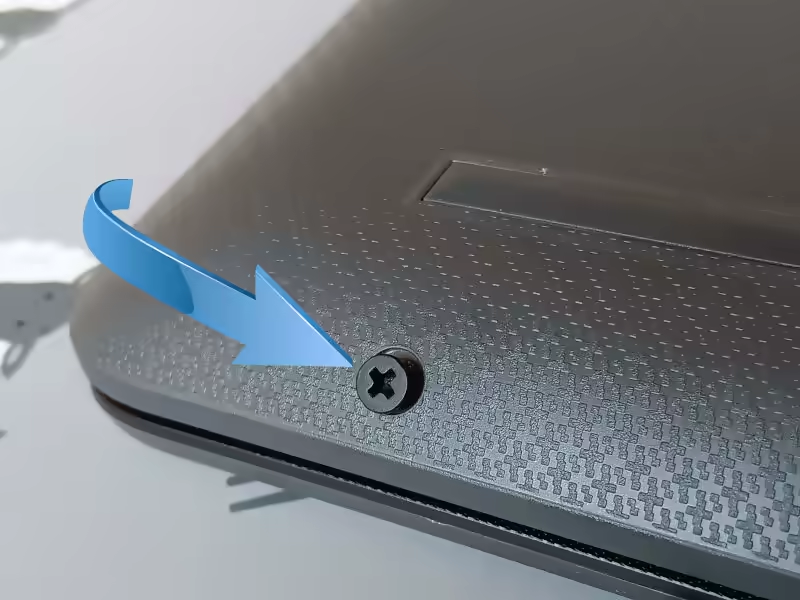
these two screws are easily removed. There are only two of the black screws of that length on this laptop.
Hidden Screws
There are many more hidden screws on the HP G9 255 laptop than there are visible screws. This is one of the keys to accessing the mainboard to see the SODIMM slot and m.2 connector.

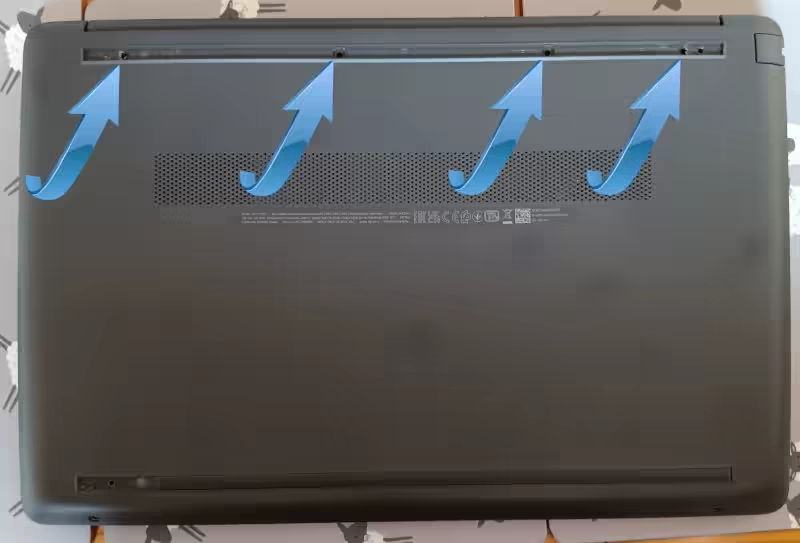
There are two rubber strips across the base of the laptop, not only are these functional to prevent the laptop from slipping as you type but they also hide the hidden fixing screws.
There are five hidden screws, four under the upper rubber strip near the hinge and one on the lower rubber strip by the lid opening. You need to fully remove the hinge end rubber strip to reveal all 4 of the screws. while the opening hidden screw is halfway, central to the rubber strip.
These secret screws are chrome plated and all 5 are the same length and thread.
That's 7 screws to remove, two short and black (exposed) while 5 are chrome plated and relatively long (hidden).
Be cautious lifting the rubber strips from the laptop. They are fixed in position with double-sided tape and the rubber is quite weak. I pulled too hard on the rubber and snapped it. If you make a mess of the double-sided sticky, you may need to source some replacement to affix the rubber strips on reassembly.

Clips
With the screws removed the base is still attached to the top of the laptop with hidden clips. With the laptop, the correct way up, carefully slip a spudger tool in the small gap between the plastic top and base that runs around the perimeter of the laptop. Gently unclip each of the hidden fixings by levering the two plastics apart. The gap between the two halves will grow as you work your way around the laptop, levering off each of the reusable clips.
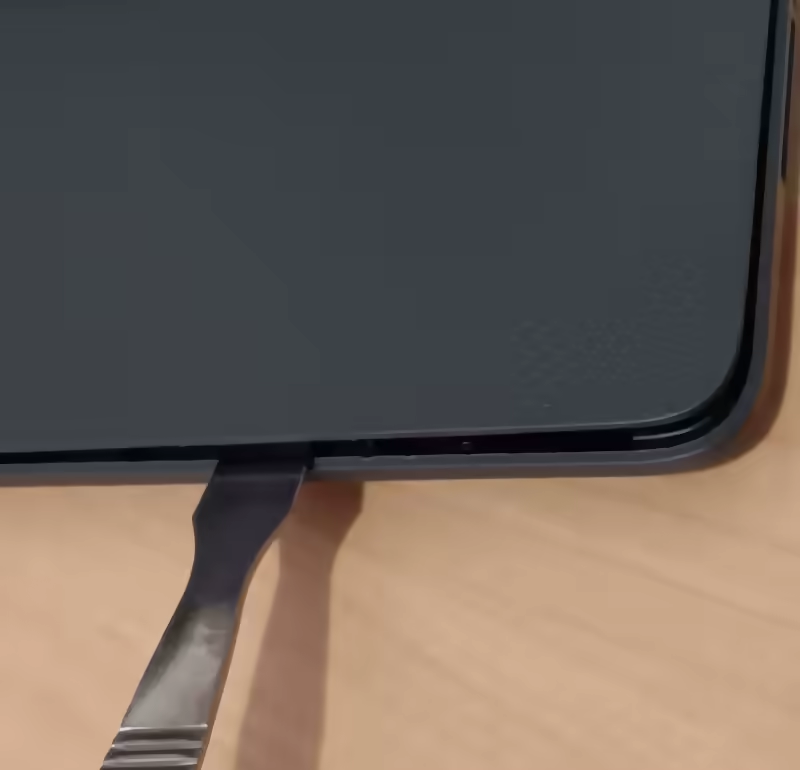
With all the clips released the plastic base is released and can be lifted off the laptop. There are no components attached to the base, it is free to be lifted away.
Mainboard
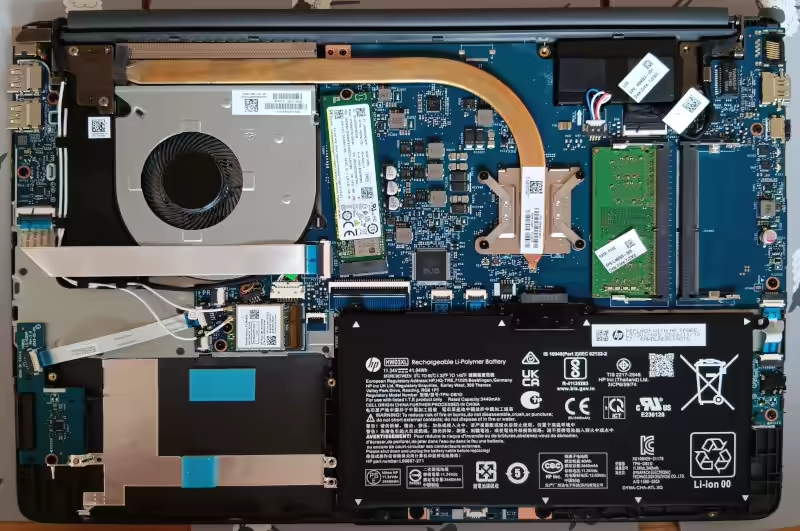
With the base now removed, the mainboard is revealed.
You now have access to:
- Battery
- SODIMM RAM strip
- Empty SODIMM Slot
- M.2 2280 SSD
- Ryzen Processor with heatsink
- WiFi card
Components
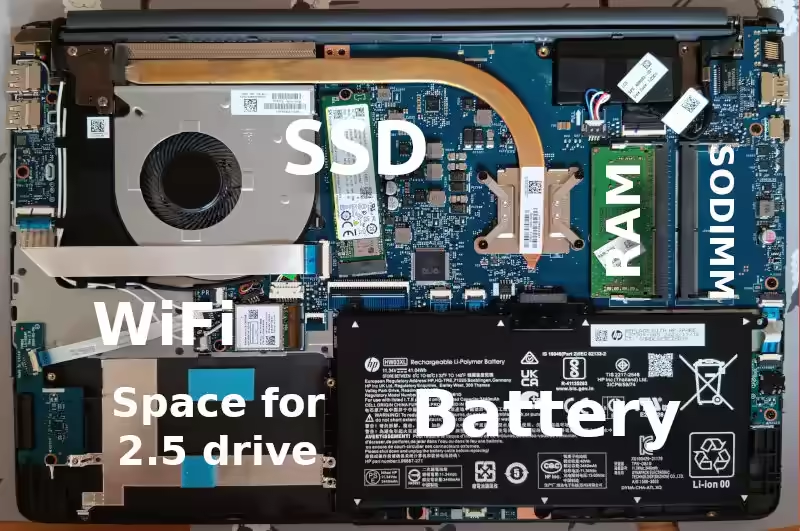
Note the 2280 SSD, the is only one fixing for the SSD and that is fixed in position for the 2280 exclusively, no other size SSD will physically fit.
Also, the Spare for a 2.5" drive is available, but the SATA to FFC lead is missing.
Why does Google think my site is unhelpful?
Search Engines October 10, 2023 0
If your site traffic or the number of visitors to your pages has reduced in September 2023, you could well be penalised by Google for having unhelpful content.
How does Google penalise sites?
Google will penalise any site by reducing the number of times it shows your site in its results. Simple, hard, cold dropping of your site from Google results. Not every result, but a reduction of around 50% of queries across the board has been seen in the wild.
Why does Google penalise site owners?
Google has officially explained that sites it deems to contain any unhelpful content will be dropped from the Google results. But even very helpful and useful sites that have been around a long time providing information and support to visitors have had their visitor numbers seriously reduced. Why did Google target the good, useful and helpful sites with the helpful site update? No one knows why, but Google thinks you are unhelpful and is trying to scrub you from the web.
Why Google?
Google is the biggest search engine, and if you have noticed the September drop in traffic, then that will be your Google visitors or, more importantly, the lack of Google visitors to your site. Unaffected are visitors from Bing and all the other search engines, but, unfortunately, the biggest search engine bot is flexing its muscles and reducing the usefulness of its search.
Spin
The Google spin on this is that they say the update is a 'helpful content update' supposedly going after and taking down the spammy, unhelpful and often plain old misleading sites. But what Google has actually done in many cases is taken some really helpful sites off their search by classing them erroneously as 'unhelpful'. Not helpful, whichever way you look at it, helpful update, unhelpful update; if the useful and helpful sites are disappearing from the Google results, it's bad for the sites and bad for the searchers.
Helpful
Witch traffic diverted from the so-called 'unhelpful sites. ' the top spots in Google are now being used to showcase other sites, ones that typically would have been lower in the results. Sites that, once in the past, didn't provide valuable content have now been pushed to the top, over and above many sites that did contain useful and helpful content. This is an odd move for a search engine and detrimental to the users of Google search engine who are getting sup-par results as their new high-ranking positions in search. More and more AI-generated content is appearing in the top Google search results, and less useful and helpful content is being shown.
Beneficial
It's not even that the sites now deemed as 'helpful' have any new content or changed any of their sites; there was no need. They got promoted because the previously 'helpful sites' have been demoted. It's a free move up the ladder for no work, like getting promoted, not because of your excellent work but because you are the only person available. It's a lift in the Google rankings by default and not by content. It has the same content, just now ranked over better sites.
Site-wide
Google has indicated in their official word about the unhelpful update that the 'unhelpful content' penalty is site-wide. If some of your content is flagged as 'unhelpful', the whole site is marked down. Every single post is tarred with the same brush.
Solutions
What is the solution to the Google unhelpful penalty?
Google has suggested if you have a subdomain linked to your domain that has two different contents, then Google has advised you to block Google crawler from the subdomain. I would imagine that Google worries the subdomain content can conflict with the main content, and the whole site (domain and subdomain) can get flagged as 'unhelpful' due to a conflict of topics and demoted in the results.
Other suggestions by Google have been to restrict access to unhelpful content on your site, but if your site is helpful, who is to say what is unhelpful?
The AI-written Google nonsense about writing content for people (as if all good sites that have been penalised didn't already do that?) is here. To see the contradiction you are dealing with.
Winners
Because dropping the helpful sites means others, traditionally deemed to be less useful, will fill the void. This can only be beneficial to those sites that see an uptick in traffic starting in September. Our advice to those is to enjoy the new visitors and not change anything because it's obviously working, bar some new content (people-first content).
Redeem one4all card to Google Play account
Technology September 30, 2023 0
How to use a One4all gift card on Google Play.
The One4all gift cards are a multi-store gift card that can be loaded from £15 to £100. You can then send or hand the gift card to the delighted recipient, who can then use the gift card balance as payment at a large number of outlets.
The advantage of Multi-Store cards is that they are not tied to one particular shop. This gives the recipient a choice of shops from which to purchase. One of the stores available to One4all is Google Play.
Problems
But it can be challenging actually to get the One4all credit onto your Google Play account. If you search for help, you are directed to a 1.5-star app on Google Play. Having such a low review rating is a red flag; avoid poorly scored apps because you have to perform very badly to make less than 2 stars.
App
I installed the app despite the low review scores and warnings from the reviewers, but the app wouldn't allow me to register, so I couldn't follow the recommended instructions to use the gifted One4all credit on the Google Play store,
Add as a visa debit.
Other advice that pops up on a search is to use the card numbers on the One4all card as if it were a Visa debit card. The CVV2 is behind a silver scratch panel on the back of the card, with the 16 digits and expiry date present on the front. This looked promising, and the numbers were entered into Google Play - add a payment method, Add credit or debit card. The authorisation fails after adding the One4All card details.
Solution
There is a solution to the problem of adding one4all card to the Google Play account, and it isn't any of the suggestions above.
What you have to do is convert the One4all gift card into a Google Play card. This is quite simple to complete online, and despite the warning it may take 24 hours, the Google Play gift card number arrived in a matter of seconds by email.
Conversion
- To convert the One4all card to a Google Play store code, visit the swap.one4all.com site.
- Enter the card details into the form.
- Select Google Play as your gift card
- Chose how much you want to spend on the One4all balance
- Enter your email address twice
- Check the email address is correct
- Press 'Check Out'
- Wait for the email from One4all
- Open the link in the One4all email
- You will be presented with a Google Play code
- Copy the Google Play code
- Tap the link to open the Google Play app - redeem a code screen.
You will now have your chosen portion or all of the One4all balance on your Google Play balance. The same amount has reduced the One4all balance. There are no charges or deductions for exchanging One4all cards for Google Play balance when it's all done online. No physical Google Play vouchers are delivered; just the codes are generated for copying and pasting into the Google Play app.
24 Hours
There was are warning that the conversion can take up to 24 hours, but after hitting the checkout button, our code was delivered in a matter of seconds.
No need to install the one4all app, no new visa card details for the Google Play app, just a simple, free and official One4all conversion of the codes.
Introduction
We have much personal experience helping customers transition from an ISP-hosted email service to a dedicated email service like Yahoo, Gmail, and Hotmail/Outlook. This was often coupled with a move to a new ISP, one that offers better value for money, faster local connection speeds, or even the loss of an ISP through a merger each time the customer would look bewildered when the suggestion was NOT to take on another ISP supplied email address linked to their account, but use a dedicated and ISP independent email service like Gmail, Yahoo Mail or Hotmail (Outlook). Those who didn't take our advice are often unwilling to switch to a different ISP because they are concerned about losing their email address.
Early Days
In the early days of the Internet, Internet Service Providers (ISPs) were the gatekeepers to the digital world, offering internet connectivity and email services bundled with their packages. These ISP-supplied email addresses were convenient and served their purpose. However, as the digital landscape evolved, these email addresses exhibited significant long-term problems that users must consider carefully. In this blog post, we delve into the perils of relying on ISP-supplied email addresses and explore why it might be time to consider alternatives.
Lack of Portability
One of the most significant drawbacks of ISP-supplied email addresses is their need for portability. When you sign up for an email address through your ISP, you become closely tied to that provider. This can pose serious challenges when you decide to switch ISPs. Moving your email account becomes a Herculean task involving notifying contacts of your new address, transferring important emails and files, and updating your online accounts. This lack of flexibility can lead to a great deal of frustration and wasted time. The old email address may still function, but there is no guarantee that it will continue to work. The ISP can switch the email service off at any time without notice or recourse. The first time you will know there is a problem is when 'Badu Username/Password' errors start appearing on the email client.
Limited Features and Functionality
Compared to dedicated email service providers like Gmail, Outlook (Hotmail), or Yahoo Mail, ISP-supplied email addresses often need to improve features and functionality. These email services may lack advanced spam filtering, robust organizational tools, seamless integration with other apps and services, and the convenience of cloud storage for attachments. As a result, users are left with a subpar email experience that hampers productivity and communication.
Security Concerns
Security is a paramount concern in today's digital age. ISP-supplied email addresses may not always provide the protection necessary to keep your sensitive information safe. These email services lack robust encryption protocols, two-factor authentication, and other security features that have become standard in modern email platforms. This leaves users vulnerable to phishing attacks, data breaches, and unauthorized access.
Professionalism and Credibility
Using an ISP-supplied email address for professional purposes can raise credibility issues. A generic email address from an ISP might not convey the professionalism and trustworthiness that a custom domain email address would in a world where online identity matters. A domain-specific email address often lends more authenticity to your communication, whether it's for business networking or job applications.
Risk of Service Discontinuation: Navigating the Uncharted Waters
In the ever-shifting landscape of technology and internet service providers, the risk of service discontinuation for ISP-supplied email addresses looms as a concerning and potentially disruptive issue. As the digital world evolves and ISPs adapt to market trends and competitive pressures, users who rely on these email addresses might face unexpected challenges.
The Domino Effect of Business Changes
Mergers, acquisitions, and closures mark the world of ISPs. When an ISP undergoes a merger or acquisition, it may lead to changes in its service offerings and priorities. This can have a direct impact on email services. For instance, if another company acquires your ISP, the acquiring company might not prioritize email services, leading to a gradual decline in service quality and support. Alternatively, the acquiring company might migrate all email accounts to its platform, causing disruptions and potential data loss.
Turbulence in the Industry
ISP market dynamics can also contribute to service discontinuation. Intense competition, shifting customer preferences, and technological advancements can influence an ISP's strategic decisions. If an ISP struggles to keep up with industry demands, it could streamline its offerings by phasing out certain services, including email. This can leave users who rely on ISP-supplied email addresses uncertain, wondering whether their accounts will be preserved or abruptly terminated.
The Tale of Defunct ISPs
The most concerning scenario is the outright closure of an ISP. Economic challenges, regulatory issues, or other factors can shut down an ISP's operations. In such cases, users may be cut off from their email accounts with little warning. This abrupt service discontinuation can result in the loss of crucial communication history, contacts, and attachments, causing considerable inconvenience and potential data loss.
The landscape of ISPs is ever-changing, with mergers, acquisitions, and business closures common occurrences. If your ISP discontinues its email services or goes out of business, you could be in a precarious situation. Losing access to your email account could mean losing important correspondence, files, and contacts. This potential risk highlights the need for a more stable and reliable email solution.
Advertising and Data Mining
Some ISPs may use their email services for advertising and data mining. This can result in intrusive ads, privacy concerns, and the sale of personal information to third parties. In contrast, many dedicated email providers have strict privacy policies and protect user data.
Advice
To navigate the risks associated with ISP-supplied email addresses, users must be proactive in safeguarding their digital communications:
- Regular Backups: Regularly back up your email data. This ensures that you can still access your important emails, contacts, and files even if service discontinuation occurs.
- Transition Planning: If you anticipate a change in ISPs or foresee potential service disruptions, consider transitioning to a more stable and reliable email provider well in advance. This might involve informing contacts of your new email address, transferring important data, and ensuring a seamless transition.
- Custom Domain Email: Consider using a custom domain email address. This provides greater control and ownership over your email account, making it less susceptible to the risks associated with ISP-dependent addresses.
- Diversify Communication Channels: Reduce reliance on a single email address for important communications. Use alternative communication channels such as phone numbers or social media to stay connected with your contacts.
- Choose a Dedicated Email Provider: Opt for an established email provider with strong service reliability and data security track record. These providers are more likely to weather industry changes and technological shifts without compromising digital communication.
With free* service offerings from the top 'Big 3'- Gmail, Yahoo Mail, and Outlook- you can start the transition today.
Conclusion
While ISP-supplied email addresses once served as a convenient gateway to the online world, the long-term problems associated with these addresses have become increasingly evident. There are compelling reasons to consider alternative email solutions, from lack of portability and limited features to security concerns and credibility issues. As the digital landscape continues to evolve, it's essential to reevaluate your email setup and opt for a more flexible, secure, and feature-rich email platform that can stand the test of time. Your digital communication deserves nothing less.
N.B.
*Free is not paid for in cash, but you do hand over some personal information to tailor targeted advertising for the use of the 'free' email service.
Where is the elusive OBD2 port located on the 2011 model Ford C Max?
Hopefully, the picture will help you locate the Second Generation C-MAX OBD port hidden behind a fold-down flap under the lighting control switch.
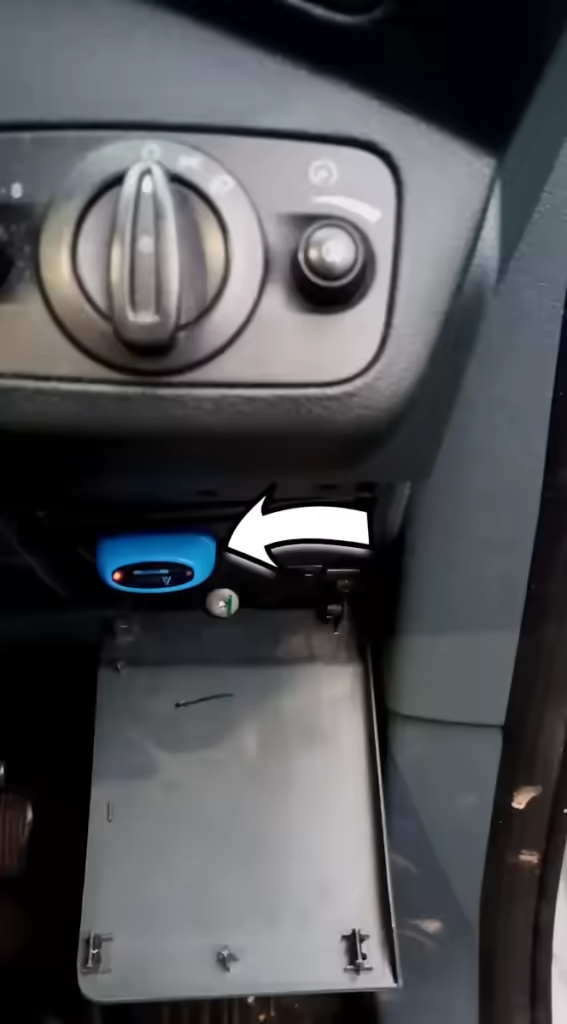
The arrow points to my NEXAS NexLink Bluetooth 5.0 OBDII Scanner (from Amazon) connected to the C-MAX OBD Port that sends data to my phone. This allows the information on the car to be read into the phone for diagnostics; the app for this is FORSCAN. The app is available for iOS, Android and Windows, designed for connecting to Ford vehicles, including the C-MAX.
OBD Port location
The OBD port is hidden behind a hinged plastic panel. The easiest way to open that plastic flap is to open the driver's door to access the edge of the top of the cover and pull it towards you. This pull will release the plastic clips and allow the cover to hinge down. With the flap down, the OBD adaptor plugs into the socket, but you may have to rotate it as the plug will only match the socket in one orientation.
Disconnecting
You need to give the adaptor a good tug to detach the OBD reader from the C MAX OBD port. Pulling the plug from the socket takes more force than you may expect. With the OBD adaptor released from the OBD port, the flap and be hinged back into the vertical position, and a firm push will re-engage the clips that hold it in place.
Close the OBD flap
Closing the cover with a device attached to the OBD port is impossible. You can remove the flap to drive the car with the OBD device attached, for example, while conducting live data tests or for black box insurance. You can unclip the flap at the bottom right hinge, and the bottom left will be free when you move the flap to the right.
What is Artificial Intelligence (A.I.)?
LLM Chat Bot April 9, 2023 0
Artificial Intelligence (A.I.) is a broad term used to describe a computer system or algorithm designed to mimic or replicate human-like cognitive abilities. These abilities include perception, reasoning, learning, and problem-solving. A.I. systems are created using complex algorithms, mathematical models, and vast amounts of data that allow them to make intelligent decisions, predictions, and classifications based on input data.
More Powerful
A.I. has been around for decades, but recent advancements in computer technology, data processing power, and cloud computing have made A.I. more powerful and accessible than ever before. Today, A.I. is used across various industries, from finance and healthcare to transportation and retail.
NLP
One of the most popular applications of A.I. is natural language processing (NLP). NLP refers to the ability of computers to understand, interpret, and generate human language. NLP is used in virtual assistants like Siri and Alexa and in chatbots used by customer service departments to provide 24/7 support.
Text to Art
A recent development in A.I. is the text-to-image production capabilities of advanced systems. Type what you want into the prompt, and A.I. can produce a picture representing your text input. Our post has some examples of this A.I. art generation that is free for the public.
Document Generation
A developing AI technology is Document Generation. This example of A.I. technology is the ChatGPT bot which can produce text documents from just a few text prompts. We have this post with examples of the ChatGPT capabilities.
Recognition
Another common use of A.I. is in image and speech recognition. Image recognition technology identifies objects, people, and other elements in an image, while speech recognition technology transcribes and translates spoken words. These technologies are used in everything from self-driving cars to security systems to help businesses analyze customer sentiment and feedback.
Healthcare
A.I. is also being used to improve healthcare. For example, machine learning algorithms are used to analyze medical images and identify early signs of disease. A.I. also analyzes electronic health records and provides personalized treatment recommendations based on patient data.
Finance
In finance, A.I. is used to analyze market trends and make investment decisions. A.I. is also being used to detect fraud and prevent financial crime. In retail, A.I. is used to analyze customer data and provide personalized recommendations to shoppers.
Overall
Overall, AI has the potential to revolutionize the way we live and work. As A.I. technology continues to improve, we can expect to see even more innovative and impactful uses of A.I. in the future. However, it is also important to consider the ethical implications of A.I. and ensure that it is used responsibly and transparently.