Free images tag: AVX2
As AI workloads and other high-performance computing tasks become more demanding, the need for faster and more efficient processing capabilities is greater than ever. One of the latest advancements in this area is AVX512 (Advanced Vector Extensions 512), an extension to the AVX2 instruction set. AVX512 is even more powerful, offering increased vector width and improved performance for tasks that involve heavy data processing, such as AI model training, scientific simulations, and large-scale data analysis.
But here’s the challenge: not all processors support AVX512, and finding one that does can be tricky. In this article, we’ll explore how to check if your processor supports AVX512, why AVX512 is beneficial, and what you need to know about the limited availability of processors with AVX512 support.
What is AVX512 and Why Is It Important?
AVX512 is an advanced SIMD (Single Instruction, Multiple Data) instruction set, introduced by Intel with their Skylake-X processors in 2017. It allows processors to handle up to 512 bits of data in a single instruction, making it incredibly useful for tasks that involve heavy data throughput, such as:
- Machine learning and AI: AVX512 can accelerate the training and inference of complex neural networks by performing more floating-point operations per clock cycle.
- Cryptography: AVX512 boosts the performance of cryptographic algorithms by processing larger data blocks in parallel.
- High-performance computing (HPC): It aids in large-scale simulations and mathematical computations, allowing faster results in scientific research, simulations, and data processing.
However, AVX512 is not as widely supported as AVX2. If you're planning to compile or run AI frameworks that can leverage AVX512, it’s essential to know if your processor supports it.
How to Check If Your Processor Supports AVX512 on Linux
To answer the question “Does my processor support AVX512?”, you can use a command in your terminal to inspect your CPU’s capabilities, similar to checking for AVX2.
Step-by-Step Process
- Open the terminal on your Linux system.
- Run this command to look for the AVX512 flag in your CPU information:
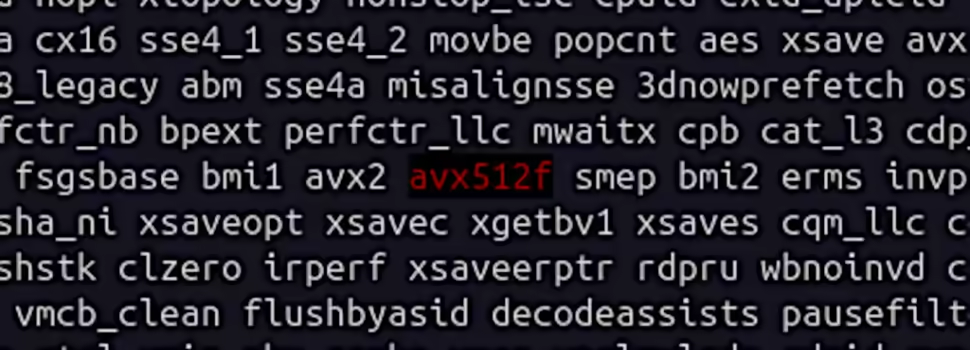
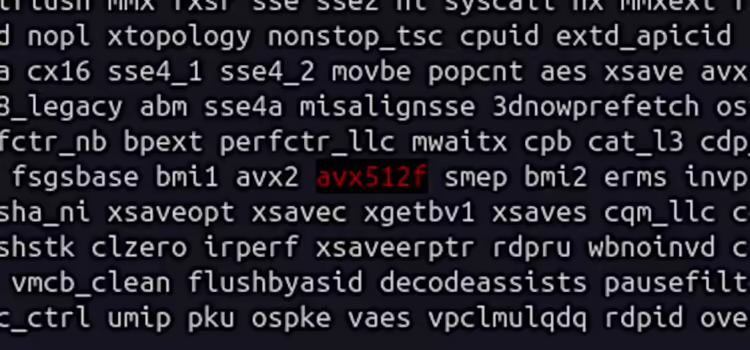
cat /proc/cpuinfo | grep avx512This command will search your CPU’s flags to see if AVX512 is supported. If AVX512 is present in the list, your processor can use this instruction set.
Interpreting the Results
- If AVX512 appears in the CPU flags, congratulations! Your processor supports AVX512, and you can take advantage of the performance benefits for AI and other demanding workloads.
- If AVX512 is missing, your processor doesn’t support it, which is not uncommon as only a limited number of processors currently include AVX512.
Here’s an example output if AVX512 is supported:
flags: fpu vme de pse tsc msr pae mce cx8 sep mtrr pge avx512fThe avx512f flag indicates that your processor supports AVX512 foundation instructions, which form the basis of the AVX512 extensions.
Which Processors Support AVX512?
While AVX512 offers immense computational power, it is currently available only on a limited range of processors. Some of the processors that support AVX512 include:
- Intel Skylake-X (2017)
- Intel Cascade Lake (2019)
- Intel Ice Lake (2019)
- Intel Tiger Lake (2020) – though limited to certain models
- Intel Sapphire Rapids (2022) – for high-performance computing
Unfortunately, AVX512 is not widely available on consumer-grade processors, and even among Intel's latest consumer CPUs, support for AVX512 has been removed or disabled in some product lines. For instance, certain Alder Lake processors initially supported AVX512 but later had this functionality disabled in firmware updates due to power and thermal concerns.
Problems in Finding AVX512-Supporting Processors
While AVX512 offers significant benefits, there are several challenges in finding a processor that supports it:
1. Limited Availability in Consumer CPUs
AVX512 is primarily found in Intel’s Xeon processors and high-end workstation chips, which are often more expensive and typically aimed at enterprise users. For consumer-grade laptops and desktops, AVX512 support is rare. Intel's mainstream consumer processors, like the Core i7 and i9 series, no longer include AVX512 support after certain iterations, which limits its use for local AI setups.
2. Power and Heat Concerns
One of the reasons AVX512 support is being phased out of consumer-grade CPUs is due to power consumption and thermal management issues. The AVX512 instruction set draws a significant amount of power, which increases the heat generated by the processor. This can lead to thermal throttling, reducing the overall performance of the CPU during sustained workloads, especially in laptops or small form-factor PCs.
3. OEM-Specific Restrictions
Even some processors that originally supported AVX512, such as early Intel Alder Lake chips, have had this feature disabled through firmware updates by OEMs. This has created confusion among users who expected AVX512 capabilities but no longer have access to them.
4. Lack of Support in Non-Intel Processors
If you're using a AMD processor, note that AVX512 support is currently absent in their consumer and enterprise offerings. AMD focuses on AVX2 in its Ryzen and EPYC series, making Intel the sole provider of AVX512-capable chips, at least for now.
Why Is AVX512 Important for AI and HPC?
For those working with AI workloads, scientific computing, or cryptography, the benefits of AVX512 can be substantial. Here’s why AVX512 is critical for these applications:
- Wider Vectors: AVX512 can handle 512-bit wide vectors, which means that it can process twice the amount of data compared to AVX2 (256-bit). This is especially useful for AI models that require large matrix operations or perform heavy floating-point calculations.
- Parallelism: AVX512 allows for greater parallelism, which helps in speeding up computation-intensive tasks like deep learning model training, large-scale simulations, or real-time data analysis.
- High-Performance AI: AI frameworks like TensorFlow and PyTorch can leverage AVX512 to optimize CPU-bound processes, giving users a noticeable performance boost when working on CPUs that support the instruction set.
How to Utilize AVX512 When Running or Compiling Software
Once you’ve confirmed that your processor supports AVX512, you can start optimizing software for it:
- Running Software: Many AI libraries automatically detect AVX512 support and optimize their execution accordingly. However, you can explicitly enable AVX512 during the compilation phase for specific applications by using flags in your build commands.
- Compiling Software with AVX512: When compiling from source, you can specify AVX512 support by adding the following flags:
-march=native -mavx512fThis ensures the compiler generates instructions optimized for AVX512.
Conclusion: Does My Processor Support AVX512?
If you’re planning to use your machine for AI development, cryptographic workloads, or any computationally heavy tasks, AVX512 support can make a significant difference in performance. However, before optimizing for AVX512, you need to answer the question, “Does my processor support AVX512?” Using the simple Linux command we’ve outlined, you can quickly check if your processor includes this instruction set.
Unfortunately, AVX512 support is currently limited to specific processors, particularly in Intel's Xeon and high-end desktop lines, making it more difficult for mainstream users to take advantage of this technology. Keep this in mind when planning your next hardware upgrade or AI project setup.
Does My Processor Support AVX2?
If you're interested in running AI instances locally on your Linux-based laptop or PC or perhaps compiling software that leverages your CPU's full potential, one key thing you’ll want to check is whether your processor supports AVX2 (Advanced Vector Extensions 2). Understanding this is crucial, especially if you're optimizing your machine for high-performance tasks such as machine learning, data analysis, or real-time video processing.
In this article, we’ll explore how to check if your processor supports AVX2, what AVX2 is, why it’s important, and how you can verify it on Ubuntu or other Linux distributions.
What is AVX2 and Why Does It Matter?
AVX2 is an extension to the original AVX instruction set introduced by Intel. It was released with Intel’s Haswell processors and has become standard in most CPUs produced since then. AVX2 significantly improves integer operations and adds support for more complex floating-point calculations, which are crucial for AI workloads, deep learning models, and heavy computational tasks.
Here’s why AVX2 matters for your AI projects and high-performance applications:
- Faster Processing: AVX2 can speed up operations like matrix multiplications, which are essential in AI and machine learning workloads.
- Efficient Resource Usage: It allows your processor to handle multiple data points in a single instruction cycle, reducing the time and resources needed to process large datasets.
- Optimization in Software: Many AI frameworks and software, such as TensorFlow or PyTorch, often use AVX2 to enhance performance during model training and inference.
Thus, if you're planning to run or compile AI software locally on your Linux machine, you need to know if your processor supports AVX2.
How to Check If Your Processor Supports AVX2 on Linux
Step-by-Step Process
If you're asking, “Does my processor support AVX2?”, you can quickly check by using a simple command in your terminal. This method works on Ubuntu and most other Linux distributions.
- Open the terminal on your Linux machine.
- Run the following command to view your CPU’s features:
cat /proc/cpuinfo | grep avx2This command looks for the avx2 flag in the output of your CPU’s information. The CPU flags section lists all the features supported by your processor, and AVX2 will appear there if supported.
Interpreting the Output
- If AVX2 is listed, congratulations! Your processor supports AVX2, and you can use this instruction set for optimizing AI applications.
- If AVX2 is not present, your CPU likely doesn’t support this feature, and you may need to reconsider some optimizations or upgrades, especially if you plan to use software that relies on AVX2 for better performance.
Here’s an example of what the output might look like:
flags: fpu vme de pse tsc msr pae mce cx8 sep mtrr pge avx2If AVX2 is highlighted in your flags, you're good to go!
Why is AVX2 Important for Running AI Locally?
Now that you know how to check whether your processor supports AVX2, let’s discuss why it’s especially relevant for running AI on local machines.
AI workloads, particularly deep learning models, require intensive numerical computations. Training a model involves processing large matrices of data (think of layers of neurons in neural networks), and AVX2 helps speed up these operations. It is commonly used by AI frameworks like TensorFlow, PyTorch, and ONNX to enhance their performance, especially when dealing with large datasets or real-time inference tasks.
For those looking to train AI models at home on a laptop or desktop, AVX2 support can make a significant difference in how quickly your models train and how efficiently your machine runs. Many precompiled binaries of AI frameworks are optimized to take advantage of AVX2, allowing them to run more smoothly on supported hardware.
How to Use the AVX2 Flag When Running or Compiling Software
Once you've confirmed that your processor supports AVX2, the next step is utilizing it effectively.
- Running Software: Some AI software will automatically detect AVX2 support and optimize accordingly. However, in some cases, you may need to explicitly specify AVX2 during the compilation or execution phase. This ensures that the software takes full advantage of your CPU’s capabilities.
- Compiling Software with AVX2: When compiling from source, you can often specify CPU architecture flags to optimize performance. For instance, you might use:
-march=native -mavx2These flags tell the compiler to generate code that uses AVX2 instructions if supported by your CPU.
Final Thoughts: Does My Processor Support AVX2?
If you're serious about optimizing your machine for AI workloads or other intensive computing tasks, the question “Does my processor support AVX2?” is one you’ll need to answer early on.
By using the cat /proc/cpuinfo | grep avx2 command in Linux, you can easily check for AVX2 support and ensure your processor can handle the demands of high-performance software.
AVX2 is a powerful feature for users running AI instances or compiling software on local Linux systems. Having this capability can drastically improve performance, especially when working with large-scale data or training deep-learning models. So, make sure your processor is up to the task before diving into those heavy AI workloads!
By checking for AVX2 support, you're taking the first step toward fully optimizing your system for AI tasks. Whether you're a developer, data scientist, or hobbyist looking to run local AI instances, AVX2 can make a notable difference in your system's performance.